How to Download Facebook Videos Safely: The Definitive Guide to Facebook Download Video
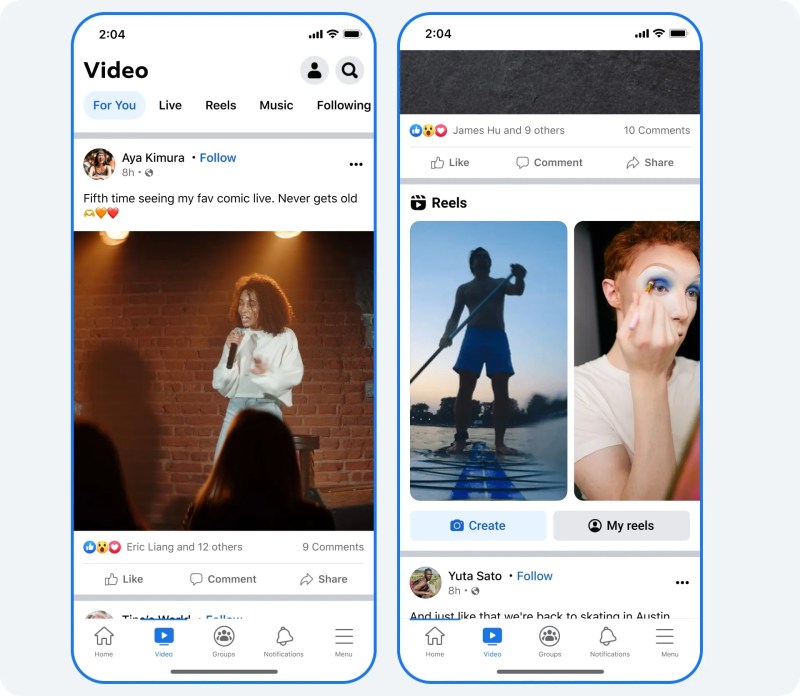
Facebook’s video library is a treasure trove of content—whether it’s a friend’s vacation clip, a viral trend, or a professional presentation. But downloading these videos isn’t as straightforward as it seems. Platform policies, technical hurdles, and security risks create a complex landscape for anyone attempting a Facebook download video. The process demands precision, awareness of legal boundaries, and an understanding of the tools at your disposal.
The rise of Facebook download video tools mirrors the platform’s own evolution. What began as a simple social network has transformed into a multimedia hub where videos dominate user engagement. Yet, despite its ubiquity, the act of saving these videos remains contentious—blurring the line between convenience and copyright infringement. Users often find themselves navigating between third-party apps, browser extensions, and manual methods, each with its own set of trade-offs.
The stakes are higher than ever. A poorly executed Facebook download video attempt can lead to malware infections, account restrictions, or even legal repercussions. Meanwhile, legitimate use cases—such as archiving personal memories or repurposing content for educational purposes—require a nuanced approach. This guide cuts through the noise, offering a structured breakdown of the mechanics, risks, and best practices surrounding Facebook download video procedures.
The Complete Overview of Facebook Download Video
The concept of Facebook download video has evolved alongside the platform’s own growth. Initially, users relied on clunky screen-recording methods or third-party websites that scraped video URLs. Today, the ecosystem includes dedicated desktop applications, browser extensions, and even built-in features (when permitted). However, the core challenge remains: Facebook’s dynamic content delivery network (CDN) and strict terms of service actively discourage unauthorized downloads.At its heart, Facebook download video hinges on two key factors: accessibility and legality. Accessibility refers to the technical feasibility of extracting video files, which depends on whether the content is publicly available, your account permissions, or the video’s hosting status (e.g., live streams vs. uploaded clips). Legality, meanwhile, is a gray area—Facebook’s policies prohibit downloading content without explicit consent, yet enforcement varies. This duality forces users to weigh convenience against risk, often leading to a patchwork of solutions.
Historical Background and Evolution
The earliest attempts at Facebook download video emerged in the late 2000s, when users discovered that video URLs could be modified to reveal direct media links. Early methods involved copying the video’s source URL (e.g., `https://video.fbcdn.net/...`) and pasting it into a media player or third-party downloader. These hacks were rudimentary but effective, as Facebook’s infrastructure was less secure. By the mid-2010s, the rise of dedicated Facebook download video websites—like SaveFrom.net or FBDown.net—simplified the process, offering one-click solutions.However, Facebook’s response was swift. The platform introduced obfuscation techniques, such as dynamic URL generation and encryption, to thwart direct downloads. Simultaneously, it tightened its terms of service, warning users against unauthorized sharing or downloading. This cat-and-mouse game forced developers to adapt, leading to the creation of browser extensions (e.g., Video DownloadHelper) and desktop apps that bypassed these restrictions through reverse-engineered protocols.
Core Mechanisms: How It Works
The technical process behind Facebook download video revolves around intercepting the video’s data stream before it renders in the browser. When you load a Facebook video, the platform dynamically fetches the media file from its CDN, often using adaptive bitrate streaming (e.g., HLS or DASH protocols). Tools designed for Facebook download video exploit this by either:1. Extracting the direct media URL from the page’s HTML or network traffic (via developer tools).
2. Using API endpoints that Facebook inadvertently exposes, such as `/video_download/` routes (though these are frequently patched).
3. Leveraging third-party servers that act as intermediaries, caching and redistributing the video.
Table of Contents
- The Complete Overview of Facebook Download Video
- Historical Background and Evolution
- Core Mechanisms: How It Works
- Key Benefits and Crucial Impact
- Major Advantages
- Comparative Analysis
- Future Trends and Innovations
- Conclusion
- Comprehensive FAQs
- Q: Is it legal to download videos from Facebook?
- Q: What’s the safest way to download a Facebook video?
- Q: Why does Facebook block some download tools?
- Q: Can I download Facebook Live videos?
- Q: What should I do if my Facebook account is restricted for downloading videos?
- Q: Are there legal alternatives to downloading Facebook videos?
Most modern Facebook download video tools combine these methods, often requiring users to install extensions or software that monitors network requests in real time. For example, an extension might detect when a video loads and automatically injects a download button, while desktop apps may scrape the video’s metadata to reconstruct the full file path.
Key Benefits and Crucial Impact
The demand for Facebook download video persists for practical reasons. For individuals, it’s about preserving memories—saving a child’s birthday video or a friend’s travel vlog before it’s deleted or the account is deactivated. Professionals, too, find value in repurposing content, such as downloading a competitor’s ad for analysis or saving a tutorial for offline reference. Even educators use Facebook download video to curate content for classrooms, though this often raises ethical questions about fair use.Yet, the impact isn’t solely positive. The proliferation of Facebook download video tools has led to widespread misuse, including piracy, data scraping, and the spread of misinformation. Facebook’s own policies reflect this tension: while the platform doesn’t actively block downloads, it reserves the right to terminate accounts or issue legal notices for violations. The result is a fragmented landscape where users must navigate between necessity and compliance.
"The internet was designed to be a tool for sharing, but sharing and downloading are not always the same thing. Facebook’s policies reflect this distinction—users can share links, but not the underlying files, unless granted explicit permission." — Meta Platforms, Inc. Terms of Service (2023)
Major Advantages
Despite the risks, Facebook download video offers several tangible benefits:- Offline Accessibility: Download videos to watch without an internet connection, ideal for travel or areas with poor signal.
- Content Preservation: Save videos before they’re deleted or accounts are restricted, ensuring personal or historical content isn’t lost.
- Repurposing for Creative Use: Edit or remix downloaded videos for personal projects, provided fair use guidelines are followed.
- Educational and Research Purposes: Download videos for academic analysis, though this must comply with copyright laws.
- Avoiding Platform Restrictions: Some videos (e.g., live streams or private posts) may be inaccessible later; downloading ensures long-term availability.

Comparative Analysis
Not all Facebook download video methods are created equal. Below is a comparison of the most common approaches:| Method | Pros and Cons |
|---|---|
| Browser Extensions (e.g., Video DownloadHelper) |
Pros: Easy to install, works across multiple sites, often free. Cons: May slow down browsing, some extensions contain ads/malware, Facebook may block them. |
| Desktop Applications (e.g., 4K Video Downloader) |
Pros: More reliable, supports batch downloads, often faster. Cons: Requires installation, some apps are paid, higher risk of bundled malware. |
| Online Downloader Websites (e.g., SaveFrom.net) |
Pros: No installation needed, works on any device. Cons: Slow speeds, privacy risks (videos pass through third-party servers), may contain ads. |
| Manual URL Extraction (Developer Tools) |
Pros: No third-party tools required, fully customizable. Cons: Technical skill required, Facebook may change URL structures, time-consuming. |
Future Trends and Innovations
The future of Facebook download video will likely be shaped by three key trends: AI-driven content moderation, shifts in platform policies, and the rise of decentralized storage. As Facebook (now Meta) doubles down on its metaverse ambitions, it may further restrict direct media downloads to prioritize its own ecosystem—such as through VR content or subscription-based libraries. Conversely, the demand for offline access could drive the development of more sophisticated (and legal) archival tools, such as cloud-based backup integrations.Another potential innovation is the use of blockchain for content ownership verification. If implemented, users might download videos only with explicit permission from the uploader, creating a more transparent system. However, this would also introduce new challenges, such as managing rights across billions of users. For now, the Facebook download video landscape remains a balancing act between user convenience and platform control.

Conclusion
The act of downloading videos from Facebook is a double-edged sword. On one hand, it serves legitimate needs—preservation, accessibility, and creative reuse. On the other, it operates in a legal gray area that can expose users to risks ranging from malware to legal action. The tools available today reflect this tension: some are convenient but risky, while others are secure but cumbersome. As the platform evolves, so too will the methods for Facebook download video, but the core principles—respect for copyright and awareness of terms of service—will remain constant.For users, the key takeaway is caution. Always evaluate the legality of your download, use trusted tools, and consider alternatives like asking the uploader for permission or using Facebook’s built-in sharing features. The goal isn’t to bypass the system but to navigate it responsibly.
Comprehensive FAQs
Q: Is it legal to download videos from Facebook?
Facebook’s terms of service prohibit downloading content without permission. However, enforcement varies—personal use (e.g., saving a friend’s video) is less likely to be challenged than commercial or large-scale downloads. Always err on the side of caution and consider fair use guidelines if repurposing content.
Q: What’s the safest way to download a Facebook video?
The safest method is to use a reputable desktop application (e.g., 4K Video Downloader) or a trusted browser extension (e.g., Video DownloadHelper). Avoid online downloader sites, as they often expose your data. For maximum security, manually extract the video URL using browser developer tools (Ctrl+Shift+I in Chrome).
Q: Why does Facebook block some download tools?
Facebook actively monitors and blocks tools that violate its terms of service. Many Facebook download video extensions or apps trigger automated systems that flag suspicious activity, leading to temporary or permanent bans. The platform also uses dynamic URL structures to make direct downloads harder.
Q: Can I download Facebook Live videos?
Downloading Facebook Live videos is more challenging due to their streaming nature. Most Facebook download video tools only work for pre-recorded content. For live streams, you’d need to use screen-recording software (e.g., OBS Studio) or a third-party service that claims to capture live feeds—though these methods are unreliable and may violate terms.
Q: What should I do if my Facebook account is restricted for downloading videos?
If your account is flagged, Facebook may issue a warning or temporary ban. To resolve this, review the platform’s terms, delete any suspicious tools, and avoid further violations. If the restriction persists, contact Facebook Support with evidence of legitimate use (e.g., personal archiving). In severe cases, legal action may be taken for repeated offenses.
Q: Are there legal alternatives to downloading Facebook videos?
Yes. If you need a video for personal use, ask the uploader for permission to download or repost. For educational purposes, check if the content is licensed under Creative Commons. Facebook’s own "Save" feature (for certain videos) allows offline viewing without full downloads, though this is limited.
Leave a Comment
Comments are moderated before appearing. The data you submit is processed according to the Privacy Policy of Medicine.