The Definitive Guide to How to Download a Facebook Video in 2024
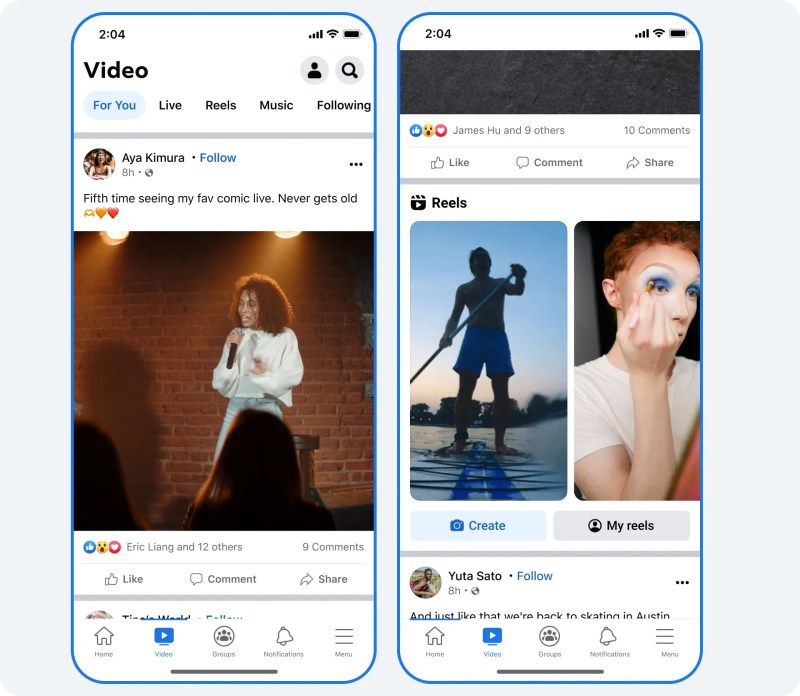
Facebook’s video ecosystem has evolved from simple clips to high-definition content, making the question of how to download a Facebook video more relevant than ever. Whether you’re archiving personal memories, repurposing content for creative projects, or analyzing trends, the ability to save videos offline is a practical necessity. However, the platform’s dynamic restrictions—shifting download policies, watermarking, and regional limitations—demand a nuanced approach. This guide cuts through the noise, offering precise, up-to-date methods tailored to different devices and use cases, while addressing the ethical and technical trade-offs involved.
The process of downloading Facebook videos isn’t uniform; it varies based on the video’s source (public, private, or shared), your device (iOS, Android, or desktop), and the tools at your disposal. Some methods rely on built-in features, while others leverage third-party software or browser extensions. The key lies in balancing convenience with legality—Facebook’s Terms of Service prohibit unauthorized downloads, but gray-area solutions exist for personal, non-commercial use. Understanding these distinctions is critical before executing any method, as missteps can lead to account restrictions or copyright infringement.
For creators and analysts, the stakes are higher. A single video may contain metadata, timestamps, or contextual cues invisible in the final output. This guide explores not just the how, but the why—when to prioritize quality over speed, or when to opt for watermarked versions to stay compliant. Below, we dissect the mechanics, benefits, and evolving landscape of Facebook video extraction, ensuring you’re equipped for both immediate needs and future-proofing your workflow.
The Complete Overview of How to Download a Facebook Video
Facebook’s video infrastructure is a dual-edged sword: it democratizes content distribution but complicates offline access. The platform’s shift toward prioritizing Reels and Stories has intensified demand for how to download a Facebook video efficiently, as users seek to bypass buffering issues or preserve content for later viewing. Unlike static posts, videos require additional steps—often involving URL manipulation, third-party APIs, or screen recording—to extract. The challenge lies in reconciling Facebook’s protective measures (like dynamic video URLs) with the technical limitations of end-user devices.At its core, the process hinges on three variables: source accessibility (public vs. private), device compatibility (mobile vs. desktop), and output quality (resolution, format). Public videos can be accessed via direct links, while private or shared content may necessitate workaround methods like screen mirroring or browser extensions. Desktop users often enjoy broader toolsets, including dedicated software like 4K Video Downloader, whereas mobile users rely on apps like Snaptube or in-built features like iOS’s "Save Video" option. The choice of method isn’t arbitrary—it’s dictated by the balance between ease of use, legal risk, and the video’s intended purpose.
Historical Background and Evolution
The concept of downloading Facebook videos emerged alongside the platform’s video-sharing capabilities, which launched in 2007 as a rudimentary upload feature. Early attempts to save videos were clunky, relying on manual screen captures or third-party sites that scraped video URLs—a practice Facebook later cracked down on with legal action against services like KeepVid. By 2013, the rise of mobile video consumption forced Facebook to adapt, introducing auto-play and adaptive streaming, which complicated direct downloads. The introduction of Facebook Live in 2016 added another layer, as live streams required real-time processing, making offline saving nearly impossible without third-party tools.Today, the landscape is fragmented. Facebook’s algorithmic changes, such as the 2021 push toward Reels, have shifted user behavior toward shorter, more shareable clips, increasing the need for quick Facebook video download solutions. Meanwhile, the platform’s ownership by Meta has led to tighter integration with Instagram, blurring the lines between the two ecosystems. This evolution has given rise to specialized tools like "Facebook Video Downloader" apps, which now incorporate features like batch processing, format conversion, and even AI-based video enhancement—all while navigating Facebook’s evolving content policies.
Core Mechanisms: How It Works
The technical foundation of how to download a Facebook video revolves around two primary methods: direct URL extraction and intermediary software. Direct URL extraction exploits Facebook’s dynamic video delivery system, where each video is assigned a unique, time-sensitive URL (often containing a `video_id` and `hd` or `sd` parameters). Tools like Inspect Element (via browser dev tools) can reveal these URLs, which can then be pasted into download managers like JDownloader. However, Facebook frequently updates its URL structure to thwart such practices, requiring users to act swiftly or use automated scripts.Table of Contents
- The Complete Overview of How to Download a Facebook Video
- Historical Background and Evolution
- Core Mechanisms: How It Works
- Key Benefits and Crucial Impact
- Major Advantages
- Comparative Analysis
- Future Trends and Innovations
- Conclusion
- Comprehensive FAQs
- Q: Is it legal to download Facebook videos for personal use?
- Q: Why does Facebook block direct downloads, and how can I bypass it?
- Q: Can I download Facebook videos in 4K quality?
- Q: Are there risks to using third-party Facebook video downloaders?
- Q: How do I download a Facebook video that’s set to private or unlisted?
- Q: Can I download Facebook Live videos after they end?
- Q: Will downloading Facebook videos get my account banned?
- Q: Are there alternatives to third-party tools for downloading Facebook videos?
- Q: How do I ensure the downloaded video retains its original quality?
- Q: Can I download Facebook videos from someone else’s profile without their permission?
Intermediary software, on the other hand, acts as a bridge between Facebook’s servers and the user’s device. These tools—ranging from browser extensions like Video DownloadHelper to standalone apps like SnapSave—employ reverse-engineered APIs or screen-capture techniques to bypass Facebook’s restrictions. Some even integrate with Facebook’s Graph API (with user permissions) to fetch videos directly. The trade-off? Performance varies: while some apps deliver near-original quality, others introduce compression artifacts or watermarks. Understanding these mechanisms is crucial for selecting the right tool for your needs, whether prioritizing speed, quality, or compliance.
Key Benefits and Crucial Impact
The ability to download Facebook videos transcends mere convenience—it enables content repurposing, accessibility, and preservation. For educators, a single lecture video can be saved for offline review; for marketers, competitor ads can be analyzed without relying on Facebook’s ad library. Even casual users benefit from downloading videos to conserve mobile data or avoid buffering issues. The impact extends to digital archivists and researchers, who rely on historical Facebook content to track cultural trends or verify information. Yet, these benefits must be weighed against ethical considerations, as unauthorized downloads can violate copyright or breach user privacy.Facebook’s own policies reflect this tension. While the platform explicitly prohibits "downloading or storing content" for redistribution, it makes exceptions for personal, non-commercial use. This ambiguity has led to a gray market of tools and services, some of which operate in legal limbo. The crux lies in intent: downloading a video to watch offline is generally tolerated, whereas compiling and redistributing clips could trigger copyright strikes. Navigating this landscape requires awareness of Facebook’s Terms of Service, as well as the potential consequences of using certain tools—some of which may contain malware or violate data privacy laws.
"The internet was designed to be a tool for sharing, but platforms like Facebook control the terms of that sharing. Users must decide where to draw the line between utility and exploitation." — Ethan Zuckerman, Director of the MIT Center for Civic Media
Major Advantages
- Offline Accessibility: Download videos to watch without an internet connection, ideal for travel or areas with poor signal.
- Data Conservation: Avoid streaming costs by saving videos to local storage, reducing mobile data usage.
- Content Preservation: Archive personal memories, live events, or educational content before they’re deleted or altered.
- Repurposing for Creativity: Edit downloaded videos for YouTube compilations, tutorials, or social media content.
- Quality Control: Choose download settings (e.g., HD vs. SD) to optimize for your device or project requirements.

Comparative Analysis
| Method | Pros and Cons |
|---|---|
| Browser Extensions (e.g., Video DownloadHelper) |
Pros: Simple, integrates with Chrome/Firefox, supports batch downloads. Cons: May flag as malicious, limited to public videos, occasional failures with dynamic URLs. |
| Mobile Apps (e.g., Snaptube, FB Video Downloader) |
Pros: Optimized for Android/iOS, often includes additional features like playlists. Cons: Risk of malware, some apps require root/jailbreak, watermarks in free versions. |
| Desktop Software (e.g., 4K Video Downloader) |
Pros: High success rate, supports 4K downloads, no ads. Cons: Paid versions required for full features, slower than mobile apps. |
| Screen Recording (Built-in Tools) |
Pros: No third-party risk, works for private content. Cons: Lower quality, time-consuming, may include UI elements. |
Future Trends and Innovations
The future of how to download a Facebook video will likely be shaped by two opposing forces: platform restrictions and user demand. As Facebook continues to monetize its video ecosystem through ads and subscriptions, direct download options may shrink, pushing users toward official (and paid) solutions like Facebook’s "Save" feature for Stories. However, the rise of AI-driven tools—such as automatic video transcription or smart clipping—could create new avenues for content extraction, blurring the line between downloading and analyzing.Emerging technologies like Web3 and decentralized storage may also reshape the landscape. Projects leveraging blockchain could enable peer-to-peer video sharing, reducing reliance on Facebook’s servers and circumventing download restrictions. Meanwhile, advancements in browser-based media extraction (e.g., WebAssembly-powered tools) might eliminate the need for third-party software entirely. For now, users must adapt to Facebook’s evolving defenses, but the underlying demand for offline access ensures that innovative workarounds will persist.

Conclusion
The question of how to download a Facebook video is less about finding a single "best" method and more about selecting the right tool for your specific context. Whether you’re a content creator, a researcher, or a casual user, the key is to balance functionality with ethical considerations. As Facebook tightens its controls, the tools and techniques for saving videos will continue to evolve, but the core principles remain: act quickly, choose reputable software, and respect copyright boundaries. By staying informed about both the technical and legal dimensions, you can navigate this landscape effectively—today and in the years ahead.For those seeking immediate action, the methods outlined in this guide provide a starting point. However, the conversation doesn’t end with the download; it extends to what you do with the content afterward. Whether you’re preserving a moment or repurposing a clip, the responsibility lies with the user to ensure their actions align with Facebook’s policies—and their own values.
Comprehensive FAQs
Q: Is it legal to download Facebook videos for personal use?
Facebook’s Terms of Service prohibit downloading content for redistribution, but personal, non-commercial use (e.g., offline viewing) is generally tolerated. However, using unauthorized tools may violate copyright laws or Facebook’s policies, risking account suspension. Always prioritize official methods like Facebook’s "Save" feature for Stories or use tools with explicit permission.
Q: Why does Facebook block direct downloads, and how can I bypass it?
Facebook blocks direct downloads to protect its revenue streams and prevent copyright infringement. Bypassing this requires exploiting dynamic URLs, using third-party tools, or screen recording. Methods like Inspect Element (for URL extraction) or apps like 4K Video Downloader work by intercepting the video stream before Facebook’s restrictions kick in. Note that these methods may fail if Facebook updates its security measures.
Q: Can I download Facebook videos in 4K quality?
Yes, but with limitations. Tools like 4K Video Downloader or certain mobile apps support 4K downloads if the original video is in that resolution. However, Facebook often compresses videos for streaming, so even if the tool claims 4K support, the output may be lower. For best results, check the video’s native resolution before downloading and use a tool that specifies "original quality" options.
Q: Are there risks to using third-party Facebook video downloaders?
Yes. Many free downloaders contain malware, adware, or trackers that compromise your privacy. Reputable tools (e.g., JDownloader, SnapSave) are safer but may still pose risks if not kept updated. Always download from official sources, read user reviews, and use antivirus software. For sensitive data, built-in screen recording or official Facebook features are lower-risk alternatives.
Q: How do I download a Facebook video that’s set to private or unlisted?
Private or unlisted videos require additional steps. If you have permission to view the video, use screen recording (iOS/Android’s built-in tools) or a tool like ApowerMirror to cast the screen to a computer and record. For shared links, ensure you’re logged into the correct account with access. Avoid third-party sites promising "private video downloads," as they often violate Facebook’s policies or contain malware.
Q: Can I download Facebook Live videos after they end?
Facebook Live videos are typically available for 87 days after broadcast, but downloading them requires the same methods as regular videos. Use a tool like 4K Video Downloader or Inspect Element to extract the URL while the video is still accessible. After 87 days, the video is usually deleted, making offline saving impossible unless you acted beforehand.
Q: Will downloading Facebook videos get my account banned?
Facebook may ban accounts for repeated use of unauthorized download tools, especially if detected through automated systems. To minimize risk, use official features (like saving Stories) or trusted tools sparingly. Avoid bulk downloads or redistributing content. If you’re unsure, test the method on a secondary account first or consult Facebook’s Community Standards for clarification.
Q: Are there alternatives to third-party tools for downloading Facebook videos?
Yes. For mobile, iOS users can use the "Save Video" feature in Safari (long-press the video link and select "Save Video"), while Android users can try apps like "Video Downloader for Facebook" from reputable developers. On desktop, browser extensions like "Facebook Video Downloader" (Chrome) or manual URL extraction via Inspect Element are viable. These methods reduce third-party risk but may have limitations (e.g., no batch processing).
Q: How do I ensure the downloaded video retains its original quality?
To preserve quality, choose a tool that offers "original quality" or "highest available" settings. Avoid apps that automatically compress files. For best results, download the video in its native resolution (e.g., 1080p or 4K) and save it in MP4 format, which retains minimal data loss. Tools like 4K Video Downloader allow you to select specific quality parameters before downloading.
Q: Can I download Facebook videos from someone else’s profile without their permission?
No. Downloading content from another user’s profile without their consent violates Facebook’s Terms of Service and may infringe on copyright. Even for personal use, this could lead to account restrictions or legal consequences. Always seek permission or use content that’s explicitly marked as public or shared with you.
Leave a Comment
Comments are moderated before appearing. The data you submit is processed according to the Privacy Policy of Medicine.