Tag
keyboard shortcuts
-

Mastering how to screenshot on HP EliteBook laptop Windows 10: Pro Tips & Hidden Tricks
Every professional who relies on an HP EliteBook laptop knows the frustration of missing a critical error message or needing to share a complex graph—only to...
-

The Definitive Guide to Opening Task Manager in Any Scenario
Some users rely on instinct, mashing Ctrl+Alt+Del until the window appears. Others, especially in corporate environments, must navigate policy restrictions...
-

The Art of Precision: How to Paste Like a Pro
Most assume pasting is a passive action, but it’s a dynamic interaction between software, hardware, and user intent. The clipboard isn’t just a temporary...
-
The Hidden Power of What Does Control F Do in Digital Efficiency
Every digital worker has experienced it: the frustration of scrolling through dense documents, emails, or codebases, searching for a specific term that feels...
-

The Right-Click Mastery Guide: How to R Click on Mac (And Why It Matters)
The right-click function—often overlooked by new Mac users—is a gateway to efficiency. Unlike Windows or traditional PCs, Apple’s design philosophy has...
-

The Essential Guide to How to Take a Snapshot of the Computer Screen in 2024
Modern workflows rely on screenshots as much as they do on typing or clicking. A well-timed capture can replace lengthy explanations, serve as evidence, or...
-

The Hidden Tricks to Type the Degree Symbol on Any Keyboard
Most users stumble upon the degree symbol by accident, often after toggling through obscure character maps or pressing random key combinations in desperation...
-
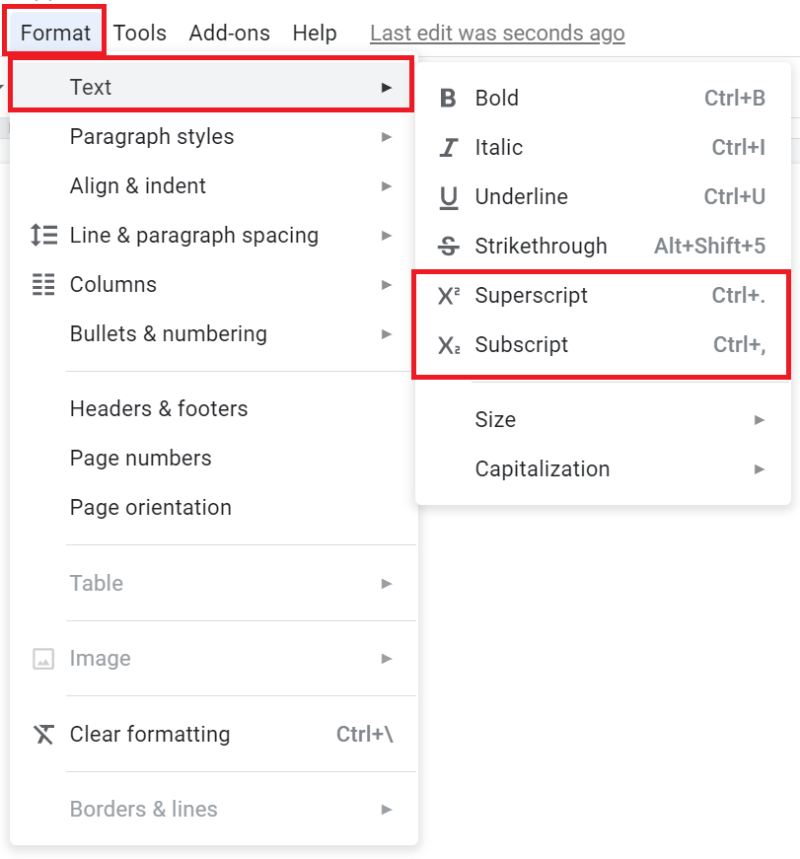
The Hidden Trick: How to Type Subscript in Google Docs—And Why It Matters More Than You Think
Most users overlook subscript’s potential, defaulting to manual resizing or clunky workarounds. But Google Docs’ native subscript function—accessible in...
-

The Hidden Art of Muting Tabs: How to Silence Digital Noise
Most users stumble upon muting tabs by accident, often after frantically searching for a way to stop an autoplaying video or a relentless notification. The...
-

The Hidden Tricks to Perfectly Type Accents on Your Keyboard
Most users stumble upon this issue by accident, frantically pressing random key combinations until the accent appears—or giving up entirely and settling for...
-

The Art of Precision: How to Search Words on a Page Like a Pro
What separates efficient searchers from the rest isn’t just familiarity with shortcuts but a strategic approach. A lawyer cross-referencing case law, a...
-

The Definitive Guide to How to Put Subscript in Word (2024 Methods)
Subscripts are the silent architects of precision in written communication. Whether you're annotating chemical formulas (H 2 O), citing footnotes, or adhering...
-

The Essential Excel Skill: How to Select Multiple Cells in Excel Like a Pro
Most users rely on the mouse, but power users leverage keyboard shortcuts and dynamic selection tools to work at lightning speed. The wrong approach can lead...
-

How Do I Paste and Copy: The Hidden Mechanics Behind Digital Efficiency
Every digital interaction begins with a simple question: how do I paste and copy? It’s the foundation of modern workflows, yet most users operate on autopilot...
-

The Definitive Guide to How to Paste on Chromebook (2024)
The frustration often stems from misconceptions. Many assume the standard Ctrl+V shortcut works universally, but Chromebooks introduce nuances: touchpad...
-

The Hidden Power of Tilde Key Shortcuts: Unleashing Efficiency
Most users press it accidentally, triggering unexpected behaviors like opening hidden menus or toggling special characters. But for power users, developers...
-

How to Restart PC with Keyboard: The Definitive Method for Every User
The keyboard remains the most underrated tool in a PC’s toolkit. While touchscreens and voice commands dominate modern interfaces, the humble keyboard still...
-

The Definitive Guide to How to Take a Snapshot on Windows
Yet, even seasoned Windows users often overlook nuanced techniques that streamline workflows. For instance, the Snipping Tool has evolved into a powerhouse...
-

How to Select Slides in Google Slides: A Masterclass in Precision
Google Slides has quietly evolved from a basic presentation tool into a sophisticated platform where selecting slides isn’t just about clicking—it’s about...
-

Mastering how to split a screen on a Mac: The Definitive 2024 Workflow
Apple’s macOS has long been the gold standard for seamless multitasking, but few users fully exploit its screen-splitting capabilities. Whether you’re juggling...