How to Post and Optimize Facebook a Video for Maximum Reach
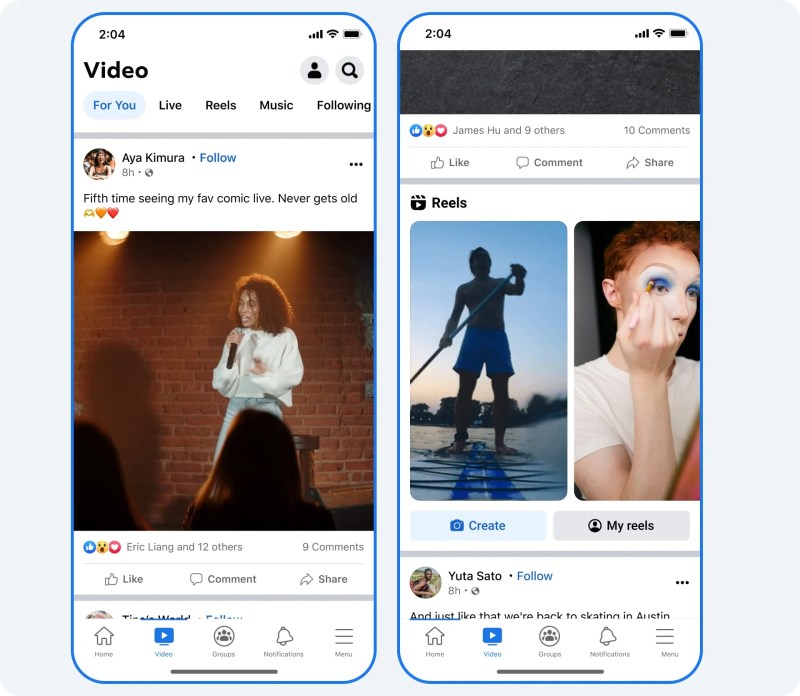
Facebook remains the world’s largest social network, but its video ecosystem has evolved into a powerhouse for creators, brands, and influencers. The ability to facebook a video—whether for personal storytelling, promotional campaigns, or live engagement—has transformed how audiences consume content. Unlike static posts, video on Facebook delivers higher retention, algorithmic favor, and monetization potential, yet many users still underutilize its full capabilities. The platform’s dynamic algorithms prioritize video content, making it a non-negotiable tool for anyone serious about digital presence.
The mechanics behind posting a video on Facebook have shifted from simple uploads to a sophisticated system of metadata, engagement triggers, and adaptive delivery. A well-optimized video isn’t just about resolution or length; it’s about aligning with Facebook’s ever-changing priorities, from watch time to interactive features. Brands that master this balance see organic reach multipliers, while individuals leverage it for viral potential. The question isn’t if you should facebook a video, but how to do it strategically.
The Complete Overview of Facebook Video Sharing
Facebook’s video infrastructure is designed to compete with standalone platforms like YouTube and TikTok, offering seamless integration with its 3 billion monthly users. The process of uploading a video to Facebook has streamlined over the years, now supporting formats from short clips to long-form storytelling, live streams, and even 360-degree content. However, the platform’s algorithmic preferences—such as prioritizing videos under 15 seconds for Reels or favoring watch time over views—demand a tailored approach. Unlike traditional video-sharing sites, Facebook’s ecosystem thrives on social interaction, meaning a video’s success hinges on comments, shares, and reactions as much as its production quality.What sets facebooking a video apart is its dual-purpose functionality: it serves as both a standalone content hub and a feed-optimized asset. A single upload can appear in News Feeds, Stories, Groups, and even Marketplace, each requiring slight adjustments in framing, captions, or call-to-action. The platform’s adaptive bitrate technology ensures smooth playback across devices, while tools like auto-captions and interactive polls enhance accessibility and engagement. For businesses, this means videos can drive traffic to websites, boost sales, or educate audiences—all within Facebook’s walled garden.
Historical Background and Evolution
Facebook’s foray into video began in 2013 with the acquisition of Instagram, but its native video capabilities took shape in 2014 when it introduced auto-playing videos in News Feeds. Initially, the platform struggled with buffering issues due to its server limitations, but by 2016, Facebook had invested heavily in infrastructure to support high-quality streaming. This shift mirrored the rise of mobile video consumption, with Facebook reporting that users spent 8 billion hours watching videos weekly by 2017—a figure that has since ballooned.The introduction of Facebook Live in 2016 marked a turning point, enabling real-time broadcasting that rivaled Periscope and Meerkat. Live videos received a 4x boost in distribution, and the feature became a cornerstone for news, events, and influencer marketing. Meanwhile, the launch of Facebook Watch in 2017 (later rebranded as a content hub) attempted to compete with Netflix and YouTube, though it ultimately folded in 2021. Despite this, the core functionality of posting videos on Facebook persisted, evolving with features like 360-degree videos, VR support, and AI-driven recommendations.
Core Mechanisms: How It Works
At its core, facebooking a video involves uploading a file (MP4, MOV, or AVI) through the web or mobile app, where Facebook’s servers process it for delivery. The platform compresses videos dynamically to reduce load times, using adaptive bitrate streaming to adjust quality based on the user’s internet speed. Behind the scenes, Facebook’s algorithm evaluates factors like viewer retention, engagement rate, and device type to determine distribution priority. Videos with higher watch time (especially the first 3 seconds) are more likely to appear in Explore sections or be recommended to non-followers.For creators, the process extends beyond uploads. Facebook’s video creation tools—such as Boomerang, Effects, and the Camera app’s editing suite—allow for in-app enhancements before sharing. Additionally, the platform’s dark post feature enables targeted distribution to specific audiences without cluttering personal timelines. This level of control ensures that whether you’re posting a video on Facebook for a global campaign or a niche community, the delivery is optimized for performance.
Key Benefits and Crucial Impact
The strategic use of Facebook video content has redefined digital marketing, offering unparalleled reach and engagement metrics. Studies show that video posts generate 1,200% more shares than text and images combined, while live videos can increase comment rates by up to 10x. For businesses, this translates to higher conversion rates, as video content is processed by the brain 60,000x faster than text. The platform’s integration with WhatsApp and Messenger further amplifies virality, allowing videos to spread across multiple channels seamlessly.Table of Contents
- The Complete Overview of Facebook Video Sharing
- Historical Background and Evolution
- Core Mechanisms: How It Works
- Key Benefits and Crucial Impact
- Major Advantages
- Comparative Analysis
- Future Trends and Innovations
- Conclusion
- Comprehensive FAQs
- Q: What file formats does Facebook support for video uploads?
- Q: How can I increase the reach of a video I’ve already posted?
- Q: Are there restrictions on copyrighted music in Facebook videos?
- Q: Can I schedule a Facebook video in advance?
- Q: How does Facebook’s algorithm decide which videos to recommend?
- Q: What’s the difference between uploading a video to Facebook vs. Instagram?
- Q: How do I add subtitles to a Facebook video?
- Q: Can I monetize Facebook videos without a large following?
- Q: Why does my Facebook video keep getting flagged for “low quality”?
- Q: How do I track the performance of my Facebook video?
What makes sharing a video on Facebook particularly powerful is its data-driven feedback loop. The platform’s Insights dashboard provides granular analytics on views, drop-off points, and audience demographics, enabling creators to refine their approach. Unlike YouTube, where videos live independently, Facebook’s social nature ensures that every upload has the potential to spark conversations, fostering community and brand loyalty.
"Video is the closest thing to a universal language. On Facebook, it’s not just about what you say, but how you say it—and the platform rewards those who say it right." — Sheryl Sandberg (former COO, Meta)
Major Advantages
- Algorithm Favorability: Facebook’s algorithm prioritizes video content in News Feeds, especially for users who frequently engage with similar media. A well-optimized video can achieve organic reach of 5–20% without paid promotion.
- Monetization Opportunities: Creators can earn revenue through in-stream ads (for pages with 10K+ followers), affiliate marketing, or direct sponsorships. Facebook’s Reels Play bonus program also rewards high-performing short-form content.
- Cross-Platform Syndication: Videos uploaded to Facebook can be automatically shared to Instagram, WhatsApp Status, and Messenger, extending reach without additional effort.
- Interactive Features: Tools like polls, quizzes, and donation stickers (for nonprofits) turn passive viewers into active participants, boosting engagement signals.
- SEO and External Traffic: Facebook videos appear in Google search results, driving external traffic to linked websites or landing pages. Descriptive captions and hashtags further enhance discoverability.

Comparative Analysis
| Feature | Facebook Video | YouTube | Instagram Reels |
|---|---|---|---|
| Primary Audience | Diverse demographics (25–65+ years), business-focused | Tech-savvy users (18–34), creators | Gen Z/Millennials, short-form content |
| Upload Limits | Up to 4GB, 120-minute max (native), 240-minute via Mobile | 128GB, 12-hour max | 90-second max (with some exceptions) |
| Monetization | In-stream ads, Reels Play bonus, affiliate links | Ad revenue, channel memberships, Super Chats | Brand deals, affiliate marketing |
| Algorithm Focus | Watch time, engagement rate, shares | Watch time, subscriber growth, CTR | Completion rate, shares, saves |
Future Trends and Innovations
The next frontier for facebooking a video lies in AI-driven personalization and immersive formats. Meta’s investment in AI summarization tools suggests that videos may soon auto-generate highlights or captions based on viewer behavior, while spatial computing (via Meta Quest) could merge Facebook videos with VR experiences. Short-form video will continue to dominate, but long-form content will see a resurgence with features like interactive chapters and collaborative editing, allowing multiple creators to contribute to a single video.Additionally, the rise of vertical video and dynamic ads (where videos adapt to user preferences in real time) will redefine targeting. As 5G adoption grows, Facebook’s ability to deliver 4K and 8K videos without buffering will become standard, further blurring the lines between social media and entertainment platforms. For creators, staying ahead will require mastering these emerging tools while maintaining authenticity—a balance that will separate the viral from the forgotten.

Conclusion
The ability to post a video on Facebook is no longer optional; it’s a necessity for anyone seeking to thrive in the digital landscape. Whether you’re a solopreneur, a marketing team, or a casual content creator, the platform’s video tools offer unmatched flexibility and reach. The key lies in understanding Facebook’s algorithmic preferences, leveraging its interactive features, and adapting to evolving trends—without sacrificing creativity.As video consumption continues to rise, those who treat facebooking a video as a strategic asset will outpace competitors. The tools are there; the question is whether you’ll use them to their full potential.
Comprehensive FAQs
Q: What file formats does Facebook support for video uploads?
Facebook accepts MP4, MOV, and AVI files with a maximum size of 4GB. For optimal quality, use H.264 compression and a square or vertical aspect ratio (9:16 or 1:1). Avoid formats like FLV or WebM, as they may not upload correctly.
Q: How can I increase the reach of a video I’ve already posted?
Boost reach by engaging with comments, sharing the video to Groups or Pages, or running a small targeted ad campaign. Repurpose the video into shorter clips for Reels or Stories, and encourage viewers to tag friends. Facebook’s algorithm favors videos with high early engagement (within the first hour).
Q: Are there restrictions on copyrighted music in Facebook videos?
Yes. Facebook’s copyright policies prohibit using copyrighted music without permission, even with low volume or background tracks. Use royalty-free platforms like Epidemic Sound or Facebook’s built-in music library (available in the Creator Studio) to avoid strikes or takedowns.
Q: Can I schedule a Facebook video in advance?
Yes, via Facebook’s Creator Studio or Meta Business Suite. Schedule videos up to 6 months ahead, and set reminders for optimal posting times. This is especially useful for businesses or creators managing multiple time zones.
Q: How does Facebook’s algorithm decide which videos to recommend?
Facebook’s algorithm prioritizes videos based on watch time, engagement rate (likes, comments, shares), relevance (to user interests), and recency. Videos with high retention in the first 3 seconds are more likely to be pushed to non-followers. The platform also considers device type and network speed to ensure smooth playback.
Q: What’s the difference between uploading a video to Facebook vs. Instagram?
While both platforms support video uploads, Facebook favors long-form content (up to 240 minutes) and integrates with Groups and Events, whereas Instagram prioritizes short-form, polished clips (Reels) and Stories. Facebook videos appear in News Feeds and Marketplace, while Instagram videos are optimized for Explore and the main feed. Cross-posting is possible but requires reformatting for each platform’s best practices.
Q: How do I add subtitles to a Facebook video?
Facebook offers auto-generated captions for most videos. To enable them, upload your video, click the three dots (More), select Edit Video, then toggle on Auto-Generated Captions. For accuracy, use a tool like CapCut or Descript to add manual captions before uploading.
Q: Can I monetize Facebook videos without a large following?
Yes, but requirements vary. For in-stream ads, your Page must have 10,000 followers and 60,000 4-minute views in the last 60 days. Alternatively, use affiliate marketing, sponsored posts, or Facebook’s Reels Play bonus program (for eligible creators). Diversifying income streams is key for smaller accounts.
Q: Why does my Facebook video keep getting flagged for “low quality”?
Low-quality flags typically occur due to poor compression (pixelation or blurriness), inconsistent framing, or background noise. Use tools like HandBrake to re-encode videos at 720p or higher, and ensure lighting is even. Avoid shaky footage unless it’s intentional (e.g., vlogging).
Q: How do I track the performance of my Facebook video?
Use Facebook Insights (via Creator Studio or Business Manager) to monitor metrics like views, watch time, drop-off points, and shares. For deeper analytics, integrate with Google Analytics or third-party tools like Hootsuite or Buffer. Focus on retention rate—videos with >50% watch time perform best.
Leave a Comment
Comments are moderated before appearing. The data you submit is processed according to the Privacy Policy of Medicine.