How to Reset Home Fire Alarm: The Definitive Guide to Silence False Alarms Without Risking Safety
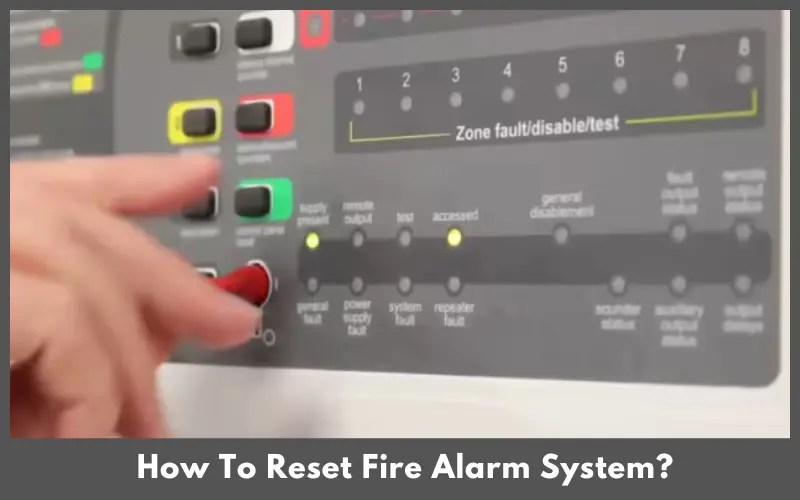
The shrill wail of a fire alarm cuts through the quiet of a home like a knife—whether it’s 3 AM or a weekend morning. Most homeowners eventually face the question: How do I reset my home fire alarm without disabling its life-saving purpose? The answer isn’t as simple as pressing a button; it requires understanding the system’s design, distinguishing between false alarms and genuine threats, and knowing when to call a professional. False alarms are more common than many realize, with U.S. fire departments responding to nearly 100,000 unintentional alarms annually. Yet, ignoring the beeping or resetting it improperly can leave your home vulnerable to real fires.
The process of how to reset home fire alarm systems varies by model, age, and type—smoke, heat, or carbon monoxide detectors each have unique protocols. Some alarms require a simple button press, while others demand a full battery replacement or system reset. The stakes are high: a malfunctioning alarm can lead to complacency, while a premature reset might mask a smoldering electrical fire. This guide cuts through the confusion, providing step-by-step instructions tailored to different scenarios, from intermittent beeping to complete system failures.
Before diving into solutions, it’s critical to recognize the difference between a nuisance alarm (triggered by steam, burnt toast, or dust) and a genuine emergency. A smoke detector’s sensitivity is calibrated to save lives, not to ignore minor household mishaps. The key lies in diagnosing the root cause—whether it’s a dead battery, dirt accumulation, or a failing sensor—before attempting a reset. Below, we break down the mechanics, benefits, and long-term strategies to ensure your alarm system remains both functional and reliable.
### The Complete Overview of How to Reset Home Fire Alarm
Fire alarms are the unsung heroes of home safety, yet their effectiveness hinges on proper maintenance and understanding. The process of resetting a home fire alarm isn’t universally standardized; it depends on the detector’s technology, age, and whether it’s part of a wired or wireless interconnected system. Modern alarms often feature hush buttons or test/reset sequences, but older models may require manual intervention, such as removing and reinstalling batteries. The first step in any reset protocol is verifying the alarm’s status: Is it a low-battery warning, a false trigger, or a system malfunction? Misdiagnosis can lead to repeated false alarms or, worse, a delayed response to actual fires.
Table of Contents
- Q: Why does my fire alarm keep beeping after I reset it?
- Q: Can I reset a fire alarm by unplugging it?
- Q: How often should I test my fire alarm?
- Q: What’s the difference between a "hush" button and a reset?
- Q: Do interconnected alarms reset individually or all at once?
- Q: Can I paint over my fire alarm’s test/reset button?
For interconnected systems—where one alarm triggers all linked detectors—the reset process becomes more complex. These systems are designed to ensure no fire goes undetected, but they also demand coordinated troubleshooting. For instance, if one detector beeps due to a dead battery, the entire network may require attention. Manufacturers like First Alert, Kidde, and Nest provide model-specific guides, but general principles apply: locate the cause, reset the device, and test functionality. The goal is to silence the alarm without compromising its ability to detect real threats. Below, we explore the evolution of fire alarm technology and the core mechanisms that dictate how they operate.
### Historical Background and Evolution
The concept of fire detection dates back to ancient civilizations, where simple mechanisms like smoke pots and water-based alarms were used to signal fires. However, the modern smoke detector emerged in the 1950s, pioneered by Duane Pearsall, who developed the photoelectric smoke detector—a device that used a light beam and sensor to detect smoke particles. This innovation laid the foundation for today’s ionization and photoelectric detectors, which dominate residential use. The National Fire Protection Association (NFPA) later standardized installation and testing protocols, mandating alarms in new homes and requiring periodic inspections.
By the 1980s, advancements in electronics led to battery-powered detectors and, eventually, interconnected alarm systems, where triggering one detector activates all linked units. This interconnected design became a game-changer, ensuring that even if one alarm fails, others compensate. Today, smart fire alarms integrate with home automation systems, sending alerts to smartphones and even silencing nuisance alarms via app commands. The evolution reflects a shift from reactive to proactive safety measures, where how to reset home fire alarm systems is just one part of a broader ecosystem designed to minimize false positives while maximizing reliability.
### Core Mechanisms: How It Works
At its core, a fire alarm operates on three primary detection methods: ionization, photoelectric, and heat sensing. Ionization detectors use a small amount of radioactive material to create an electrical current; when smoke disrupts this current, the alarm sounds. Photoelectric detectors, on the other hand, rely on a light beam and sensor—smoke scatters the light, triggering the alarm. Both methods have strengths: ionization detects flaming fires faster, while photoelectric is better for smoldering fires. Heat detectors, common in kitchens, activate when temperatures exceed a set threshold.
The reset mechanism varies by type. Most battery-powered alarms have a test/reset button (often labeled "Test" or with a pencil icon). Pressing and holding this button for 15–30 seconds typically silences the alarm, but this only works if the issue is a low battery or false trigger. If the alarm continues beeping after reset, it may indicate a faulty sensor or wiring issue, requiring professional inspection. Hardwired alarms connected to a home’s electrical system may need a circuit reset or replacement of the entire unit. Understanding these mechanics is crucial when troubleshooting how to reset home fire alarm systems without voiding their safety functions.
### Key Benefits and Crucial Impact
A properly functioning fire alarm system is a lifesaver, reducing the risk of fire-related fatalities by up to 50% in residential settings. Beyond saving lives, these devices minimize property damage by detecting fires in their early stages. The ability to reset a home fire alarm correctly ensures that the system remains operational when it matters most. False alarms, while frustrating, serve as a reminder to inspect and maintain detectors regularly. Neglecting this maintenance can lead to battery failures, dust buildup, or sensor degradation, all of which compromise the alarm’s effectiveness.
> "A fire alarm that never goes off is just as dangerous as one that never stops." — NFPA Fire Safety Standards
The psychological impact is equally significant. Knowing that your home’s alarm system is reliable and responsive provides peace of mind, especially for families with children or elderly members. For renters, understanding how to reset home fire alarm systems can prevent conflicts with landlords over nuisance alarms. Meanwhile, homeowners benefit from lower insurance premiums when alarms are properly maintained and tested.
### Major Advantages
- Prevents False Alarms: Proper reset techniques reduce unnecessary disturbances, making the system more reliable.

### Comparative Analysis
| Feature | Battery-Powered Alarms | Hardwired Alarms |
|---------------------------|----------------------------------|----------------------------------|
| Reset Method | Test/reset button or battery swap | Circuit reset or unit replacement |
| Maintenance Needs | Annual battery checks | Professional wiring inspections |
| False Alarm Rate | Higher (dust, steam) | Lower (less sensitive to environment) |
| Cost | $10–$30 per unit | $50–$150+ (installation included) |
### Future Trends and Innovations
The next generation of fire alarms is moving toward AI-driven detection and smart home integration. Companies like Google Nest and Amazon are developing alarms that learn household patterns, distinguishing between smoke and steam from a shower. Voice-assisted resets (via Alexa or Google Assistant) are becoming standard, allowing users to silence alarms with a simple command. Additionally, self-testing systems that automatically alert homeowners to low batteries or sensor issues are reducing the need for manual checks.
Another emerging trend is wireless mesh networks, where alarms communicate with each other without relying on a central hub. This improves reliability in large homes or multi-unit buildings. As IoT (Internet of Things) technology advances, fire alarms may soon predict fires by monitoring unusual electrical activity or temperature spikes before smoke appears. For now, how to reset home fire alarm systems remains a manual process, but the future promises self-sustaining, adaptive safety networks.
### Conclusion
Resetting a home fire alarm is more than a quick button press—it’s a critical safety procedure that balances convenience with reliability. Whether dealing with a nuisance alarm, low battery, or system malfunction, the correct approach ensures your detectors remain functional and responsive. The key takeaway: diagnose the issue first, then reset. Ignoring persistent beeping or skipping maintenance can turn a minor annoyance into a life-threatening oversight.
For most homeowners, how to reset home fire alarm systems involves a few simple steps: checking batteries, testing functionality, and cleaning sensors. However, when in doubt, consult the manufacturer’s manual or a licensed electrician. The goal isn’t just to silence the alarm—it’s to preserve the system that protects your home and family.
### Comprehensive FAQs
Q: Why does my fire alarm keep beeping after I reset it?
A: If the alarm continues beeping after a reset, it likely indicates a low battery, dirty sensor, or failing unit. Try replacing the battery first. If the beeping persists, the detector may need cleaning or replacement. For hardwired alarms, check the circuit breaker.
Q: Can I reset a fire alarm by unplugging it?
A: Unplugging a hardwired alarm will not reset it permanently—the system may still trigger if the issue isn’t resolved. Instead, locate the test/reset button or consult the manufacturer’s guide. Battery-powered alarms should never be unplugged; replace the battery instead.
Q: How often should I test my fire alarm?
A: The NFPA recommends testing smoke alarms monthly and replacing batteries at least once a year. For hardwired alarms, annual professional inspections are advised. Regular testing ensures how to reset home fire alarm systems remain second nature in emergencies.
Q: What’s the difference between a "hush" button and a reset?
A: A hush button (found on some modern alarms) temporarily silences the alarm for 5–15 minutes, allowing you to investigate without disabling the detector. A reset (via the test button) addresses underlying issues like low batteries. Use the hush button for minor disturbances; reset for persistent problems.
Q: Do interconnected alarms reset individually or all at once?
A: In interconnected systems, resetting one alarm should not trigger others if the issue is isolated (e.g., dead battery). However, if the problem is wiring or a central control panel, all alarms may need attention. Always check the manufacturer’s instructions for multi-unit systems.
Q: Can I paint over my fire alarm’s test/reset button?
A: No. Painting or covering the test/reset button can disable the alarm’s functionality. If the button is damaged, replace the entire unit. Fire alarms must remain fully accessible and operational at all times.

Leave a Comment
Comments are moderated before appearing. The data you submit is processed according to the Privacy Policy of Medicine.