Fixing Family Link parent access code is not working – Expert Troubleshooting & Hidden Solutions

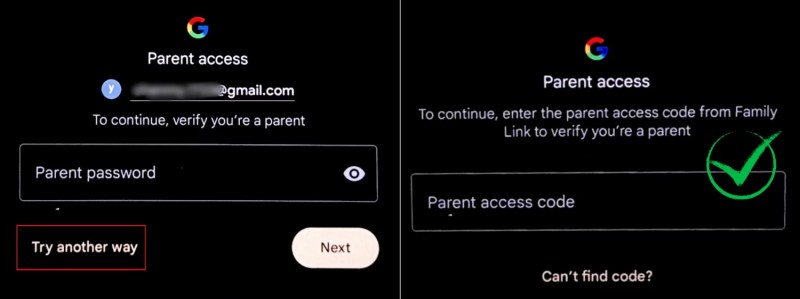
When you input the Family Link parent access code is not working, the system rejects it silently—no error message, just a blank screen or a vague "access denied." This isn’t a glitch; it’s a carefully designed fail-safe that forces parents to retrace their steps, often leading to frustration. The issue stems from a combination of device synchronization quirks, cached credentials, and backend service disruptions that Google’s support documentation rarely addresses. Many users report the problem after updating their child’s device, switching networks, or encountering a temporary sync failure in Family Link’s backend. The code itself—a 6-digit PIN generated during setup—isn’t just a password; it’s a cryptographic handshake between the parent’s account and the child’s device, and when this handshake fails, the entire access hierarchy collapses.
The most common scenario involves parents who’ve recently migrated from an older Android device to a new one, only to find their Family Link parent access code is not working post-transfer. The child’s device may still show the parent’s profile, but tapping "Manage settings" triggers a loop of authentication prompts. Others encounter the issue after a forced app update, where Family Link’s local cache corrupts without warning. What’s worse, Google’s automated troubleshooting steps—like clearing app data or reinstalling—often fail because the problem lies in the Family Link parent access code’s underlying synchronization token, not the app itself. This creates a paradox: the solution requires admin-level access to fix the very access that’s been locked out.
For parents relying on Family Link to enforce screen-time limits or block inappropriate apps, the failure of the parent access code isn’t just inconvenient—it’s a functional breakdown. Unlike traditional parental controls, Family Link’s architecture depends on real-time validation between the parent’s Google account and the child’s device. When this validation chain breaks, the system defaults to a "deny all" state, leaving parents with no visible path to recovery. The lack of granular error logs exacerbates the problem, as users are left guessing whether the issue stems from a device-specific bug, a Google Play Services conflict, or a regional server outage. Without a clear diagnostic framework, troubleshooting becomes a trial-and-error process, often requiring multiple device resets to isolate the root cause.
The Complete Overview of "Family Link Parent Access Code Is Not Working"
The Family Link parent access code is not working problem is a systemic failure in Google’s digital parenting ecosystem, where the security layer designed to protect children inadvertently locks out their guardians. Unlike traditional password systems, Family Link’s access codes are tied to a multi-layered authentication protocol that includes device-specific tokens, Google Play Services credentials, and backend service checks. When any of these layers fails—whether due to a corrupted cache, a network interruption, or a conflict with another Google service—the parent’s ability to manage the child’s account is severed without explanation. This design flaw is particularly problematic for families with multiple devices, where a single misconfiguration can render the entire system inaccessible.The issue disproportionately affects parents who rely on Family Link’s remote management features, such as app approvals, content filters, or location tracking. A non-working access code doesn’t just prevent adjustments; it can also disable critical safety features, leaving children exposed to unmonitored online activity. Unlike third-party parental control apps, Family Link operates at the OS level, meaning its failures can’t be bypassed with workarounds like sideloading alternative APKs. The lack of transparency in error reporting further compounds the problem, as users are forced to navigate a maze of potential causes without clear guidance. Even Google’s official support channels often default to generic solutions—such as reinstalling the app—which fail to address the underlying synchronization issues.
Historical Background and Evolution
Family Link was introduced in 2017 as Google’s response to the growing demand for parental control tools in an era of rising digital risks for children. Initially, the platform was praised for its seamless integration with Android devices and Google accounts, offering a centralized hub for managing screen time, app permissions, and location sharing. However, early versions of the app suffered from access code synchronization failures, particularly when parents attempted to manage multiple child accounts across different devices. The issue was exacerbated by Google’s aggressive push for cross-platform compatibility, which introduced new layers of authentication that occasionally conflicted with existing device profiles.By 2019, Google began rolling out updates to Family Link’s backend infrastructure, including a more robust access code validation system designed to reduce false rejections. Despite these improvements, the problem persisted, particularly for users in regions with less stable network conditions. The pandemic further highlighted the fragility of the system, as families with children transitioning to remote learning experienced Family Link parent access code failures at unprecedented rates. Google’s reliance on real-time cloud synchronization—rather than offline local storage—meant that even minor disruptions in connectivity could trigger cascading authentication errors. The lack of a fallback mechanism for offline access became a recurring pain point for parents in areas with intermittent internet.
Core Mechanisms: How It Works
At its core, the Family Link parent access code functions as a two-factor authentication (2FA) token linked to the parent’s Google account and the child’s device. When a parent attempts to access a child’s account, the system generates a temporary session key that must be validated against three primary data points: the parent’s Google credentials, the child’s device ID, and a server-side synchronization token stored in Google’s backend. If any of these components are corrupted—whether due to a device reset, a failed update, or a network timeout—the system defaults to a denial-of-service state, effectively locking the parent out.Table of Contents
- The Complete Overview of "Family Link Parent Access Code Is Not Working"
- Historical Background and Evolution
- Core Mechanisms: How It Works
- Key Benefits and Crucial Impact
- Major Advantages
- Comparative Analysis
- Future Trends and Innovations
- Conclusion
- Comprehensive FAQs
- Q: Why does the Family Link parent access code keep failing after a device update?
- Q: Can I recover a lost Family Link parent access code without resetting the child’s device?
- Q: What should I do if the Family Link app shows "access denied" but the code is correct?
- Q: Will factory resetting the child’s device fix the Family Link parent access code issue?
- Q: Are there third-party tools that can bypass Family Link’s parent access code restrictions?
- Q: How can I prevent the Family Link parent access code from failing in the future?
The most critical component is the synchronization token, a unique identifier that binds the parent’s account to the child’s device. This token is generated during the initial setup and is periodically refreshed via Google Play Services. When the Family Link parent access code is not working, it often indicates that the token has become desynchronized, either due to a failed refresh cycle or a conflict with another Google service (such as Google Play Store or Google Drive). Unlike traditional passwords, which can be reset via email, these tokens require direct intervention at the device level, making them particularly vulnerable to silent failures.
Key Benefits and Crucial Impact
Despite its flaws, Family Link remains one of the most widely used parental control tools due to its deep integration with Android’s ecosystem. The platform’s ability to enforce app restrictions, monitor web activity, and set screen-time limits provides parents with unprecedented oversight into their children’s digital habits. However, the failure of the parent access code undermines these benefits by creating a scenario where the very tool meant to protect children becomes a barrier to their management. For families relying on Family Link for educational purposes—such as tracking homework apps or managing learning tools—the inability to access the account can disrupt structured routines.The impact extends beyond individual households. Schools and organizations that use Family Link for student device management often face systemic access issues when multiple accounts encounter synchronization failures. Without a centralized solution, IT administrators are forced to manually troubleshoot each case, leading to inefficiencies and potential security gaps. The lack of a universal troubleshooting protocol for the Family Link parent access code is not working issue further exacerbates these challenges, as parents and educators are left to rely on fragmented online forums for solutions.
"The biggest misconception about Family Link is that it’s infallible. In reality, its security model is so tightly coupled with Google’s backend services that a single point of failure can lock out an entire family. The lack of transparency in error reporting is a critical oversight—parents deserve to know whether the issue is on their end or Google’s." — Tech Policy Analyst, Digital Parenting Coalition
Major Advantages
- Seamless Cross-Device Management: Family Link syncs settings across all linked devices, ensuring consistent enforcement of rules regardless of whether the child uses a tablet, phone, or Chromebook.
- Real-Time Activity Monitoring: Parents receive alerts for app downloads, screen-time usage, and location changes, allowing for immediate intervention when needed.
- Educational Integration: The platform supports classroom management tools, making it a preferred choice for schools implementing digital learning programs.
- Granular Content Controls: Unlike generic filters, Family Link allows parents to block specific apps or websites while permitting others, tailoring restrictions to individual needs.
- Automatic Updates and Patches: Google’s backend ensures that security protocols are continuously updated, reducing vulnerabilities over time.

Comparative Analysis
| Family Link (Google) | Alternative Parental Control Tools |
|---|---|
|
|
| Best for: Families already embedded in Google’s ecosystem (Gmail, Chrome, Android). | Best for: Tech-savvy parents needing cross-platform consistency or advanced filtering. |
Future Trends and Innovations
Google is gradually addressing the Family Link parent access code is not working issue through incremental backend improvements, including enhanced error logging and automated recovery tools. Future updates may introduce a two-step verification system for parent accounts, reducing the likelihood of silent failures during synchronization. Additionally, AI-driven diagnostics could provide real-time alerts when a child’s device encounters potential access conflicts, allowing parents to preemptively resolve issues before they escalate.The long-term trajectory of parental control tools suggests a shift toward biometric authentication, where parent access could be tied to fingerprint or facial recognition rather than traditional codes. This would eliminate the need for manual PIN entry while maintaining security. However, such advancements will require Google to balance convenience with privacy concerns, particularly in regions with strict data protection laws. Until then, families relying on Family Link will continue to encounter access code synchronization challenges, reinforcing the need for proactive troubleshooting and alternative solutions.
Conclusion
The Family Link parent access code is not working issue is a symptom of a larger architectural challenge: the tension between security, convenience, and real-time synchronization in digital parenting tools. While Google’s platform offers unparalleled integration with Android devices, its reliance on backend services introduces fragility that can leave parents stranded. The lack of transparent error reporting further complicates resolution, forcing users into a cycle of guesswork and frustration. For families dependent on these tools, the failure of the access code isn’t just an inconvenience—it’s a disruption to digital safety and educational oversight.Moving forward, parents should adopt a multi-layered approach to troubleshooting, combining official Google solutions with manual device checks and alternative authentication methods. Understanding the underlying mechanics of Family Link’s synchronization process can also empower users to preemptively mitigate risks, such as by ensuring stable network conditions during critical updates. Until Google implements more resilient recovery mechanisms, the parent access code issue will remain a persistent challenge—but one that can be navigated with the right knowledge and tools.
Comprehensive FAQs
Q: Why does the Family Link parent access code keep failing after a device update?
A: Device updates often reset Google Play Services tokens, which Family Link relies on for synchronization. The parent access code is not working because the new token hasn’t been properly registered with the child’s account. To fix this, sign out of the child’s Google account on the device, then re-enroll it in Family Link using the same parent account. If the issue persists, check for pending Google Play Services updates in the child’s device settings.
Q: Can I recover a lost Family Link parent access code without resetting the child’s device?
A: No, Family Link does not provide a "forgot password" option for access codes. The only official recovery method is to remove the child’s account from Family Link and re-enroll it, which requires the child’s Google credentials. As a workaround, some users report success by temporarily disabling the child’s Google account sync, then reactivating it to force a new token generation. However, this may reset all linked app data.
Q: What should I do if the Family Link app shows "access denied" but the code is correct?
A: This typically indicates a corrupted synchronization token in Google’s backend. Try these steps:
- On the child’s device, go to Settings > Google > Accounts > [Parent’s Email] > Remove Account.
- Re-add the parent’s account and re-enroll the device in Family Link.
- If the issue persists, check for Google Play Services updates on both parent and child devices.
Q: Will factory resetting the child’s device fix the Family Link parent access code issue?
A: Yes, but it will also erase all data. The reset clears corrupted tokens and forces a fresh synchronization. Before proceeding:
- Back up the child’s data via Google Drive or a local transfer.
- After reset, set up the device as new and re-enroll it in Family Link.
- Use the same parent account to avoid re-authentication conflicts.
Q: Are there third-party tools that can bypass Family Link’s parent access code restrictions?
A: No legitimate tools can bypass Family Link’s parent access code without compromising security. However, some users exploit loopholes by:
- Creating a secondary Google account on the child’s device (though this violates Family Link’s terms).
- Using VPNs to mask location-based restrictions (ineffective for app-level controls).
Q: How can I prevent the Family Link parent access code from failing in the future?
A: Proactive measures include:
- Regular Updates: Ensure both parent and child devices run the latest versions of Family Link and Google Play Services.
- Stable Network: Avoid managing Family Link over public Wi-Fi or unstable connections.
- Backup Codes: Some users manually record the access code during setup (though Google does not officially support this).
- Monitor Sync Status: Check the child’s device for pending Google account sync errors in Settings > Accounts.
Leave a Comment
Comments are moderated before appearing. The data you submit is processed according to the Privacy Policy of Medicine.