How to Download a Facebook Video Online: The Definitive 2024 Method
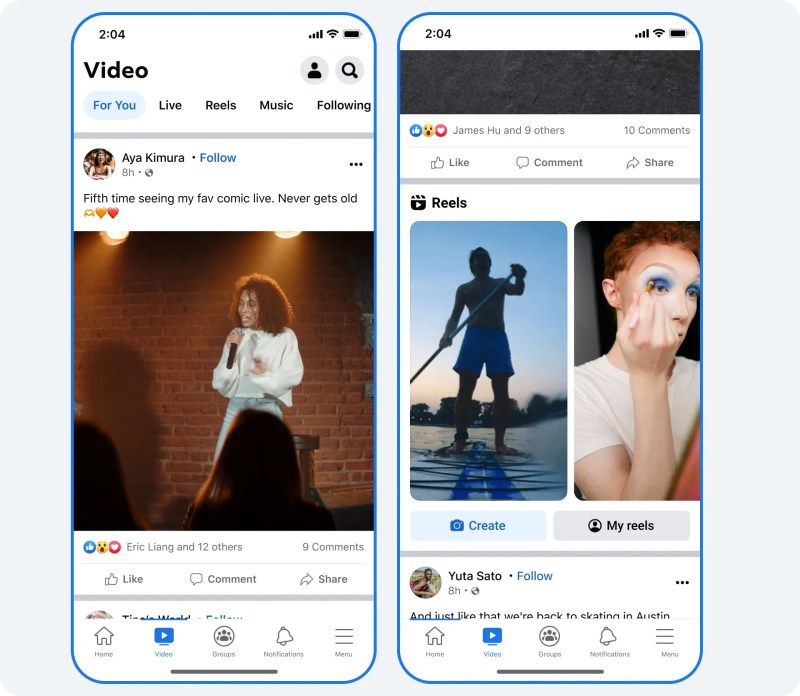
Facebook’s video ecosystem remains one of the most dynamic yet restrictive in digital media. While the platform discourages direct downloads through its native interface, millions still seek ways to download a Facebook video online—whether for archival, offline viewing, or content repurposing. The methods range from browser-based utilities to third-party software, each with distinct trade-offs in legality, quality, and ease of use. What’s often overlooked is the balance between convenience and risk: unchecked downloads can expose users to malware, violate copyright, or trigger account restrictions.
The demand for saving Facebook videos online stems from practical needs. Professionals editing clips for presentations, creators preserving viral moments, or users simply wanting to watch content without buffering interruptions all require reliable solutions. Yet, the lack of an official export feature forces reliance on unofficial tools—some of which exploit Facebook’s APIs or scrape content from its servers. Understanding these mechanics is critical to navigating the landscape without falling into common pitfalls like broken links or degraded video quality.
Facebook’s stance on downloading Facebook videos online has evolved alongside its platform dominance. Early iterations of the site treated video as secondary to text-based interactions, but as mobile consumption surged, so did the need for offline access. The introduction of Facebook Watch in 2016 marked a turning point, though it didn’t address user-driven downloads. Today, the platform’s terms of service explicitly prohibit scraping or unauthorized distribution, yet the gray area persists for personal use. This tension between user behavior and corporate policy creates a market for workaround tools—some ethical, others exploitative.
The Complete Overview of Downloading Facebook Videos Online
The process of downloading a Facebook video online hinges on three primary factors: the video’s accessibility (public, unlisted, or private), the user’s technical proficiency, and the tool’s compatibility with Facebook’s evolving security measures. Public videos are the easiest to extract, often requiring nothing more than a URL and a compatible extension or website. Private or unlisted content, however, demands additional steps—such as temporary sharing permissions or third-party APIs—that introduce legal and ethical considerations. The quality of the downloaded file also varies: some tools preserve original resolution, while others compress media to reduce file size, potentially sacrificing detail.Beyond the technical execution, the methods to download Facebook videos online reflect broader trends in digital consumption. The rise of ad-blocker extensions and privacy-focused browsers has indirectly fueled the demand for standalone download tools, as users seek to bypass Facebook’s built-in restrictions. Additionally, the proliferation of AI-powered video analysis tools has created a secondary market for downloaded clips, where users repurpose content for memes, tutorials, or machine learning datasets. This dual-use scenario underscores the need for transparency in how these tools operate—whether they’re merely extracting data or engaging in deeper content manipulation.
Historical Background and Evolution
The concept of saving Facebook videos online predates the platform’s video-centric era. In the late 2000s, users relied on screen-capture software or manual frame-by-frame downloads to preserve content, a cumbersome process that mirrored early internet practices. The shift occurred in 2011 when Facebook introduced native video uploads, initially limited to 20-minute clips. This change coincided with the emergence of the first dedicated download tools, which leveraged Facebook’s API to fetch video URLs and redirect them to media hosts. Early solutions were rudimentary—often requiring manual URL manipulation or browser extensions with limited functionality.By 2015, as Facebook’s algorithm prioritized video content, the tools evolved to include automated downloaders that could handle higher resolutions and dynamic video IDs. The introduction of Facebook Live further complicated the landscape, as live streams required real-time capture methods distinct from on-demand videos. Developers responded by creating specialized software that could buffer live content into downloadable formats, though these often faced latency issues. Today, the process to download Facebook videos online is streamlined but fragmented, with tools catering to niche use cases—from batch downloads for marketers to single-file extraction for casual users.
Core Mechanisms: How It Works
At its core, downloading a Facebook video online involves intercepting the media file’s direct URL before Facebook’s server delivers it to the user’s browser. Most tools achieve this by parsing the video’s HTML source code to locate the embedded `Table of Contents
- The Complete Overview of Downloading Facebook Videos Online
- Historical Background and Evolution
- Core Mechanisms: How It Works
- Key Benefits and Crucial Impact
- Major Advantages
- Comparative Analysis
- Future Trends and Innovations
- Conclusion
- Comprehensive FAQs
- Q: Is it legal to download a Facebook video online?
- Q: Can I download Facebook videos without installing software?
- Q: Why does the downloaded video quality differ from the original?
- Q: Will downloading Facebook videos get my account banned?
- Q: How do I download a Facebook Live video after it ends?
- Q: Are there free tools to download Facebook videos online?
- Q: Can I download Facebook videos from mobile devices?
- Q: What’s the best format to download Facebook videos in?
- Q: How do I bypass Facebook’s download restrictions?
- Q: Are there risks to my privacy when downloading Facebook videos?
The technical execution varies by method. Browser extensions, for instance, inject JavaScript into the page to extract the video URL and trigger a download via the user’s default media player. Desktop applications often employ headless browsers (like Puppeteer) to automate the process, while online services rely on server-side processing to handle the extraction. The quality of the downloaded file depends on the tool’s ability to preserve the original bitrate and codec. Tools that support 4K or HD downloads typically employ higher-tier CDN access, which may require premium subscriptions or paid APIs.
Key Benefits and Crucial Impact
The ability to download Facebook videos online addresses immediate practical needs but also reflects broader shifts in digital media consumption. For professionals, it eliminates the dependency on unstable internet connections, allowing for offline editing or presentations without buffering interruptions. Creators benefit by archiving viral moments or user-generated content for repurposing, while educators can compile clips into curated playlists for students. Even casual users gain flexibility—whether saving a child’s birthday video or a tutorial for later reference.The impact extends beyond individual convenience. Businesses leverage downloaded content for analytics, monitoring competitor campaigns or tracking trending topics in real time. Developers use scraped video data to train AI models, though this practice raises ethical questions about consent and data ownership. Facebook’s own policies indirectly encourage these behaviors by offering no native export functionality, forcing users into third-party solutions. The result is a paradox: a platform that thrives on content sharing yet restricts its own users from accessing it fully.
"The gap between what platforms offer and what users need creates a market for workarounds—some innovative, others exploitative. The key is balancing access with responsibility." — Tech Policy Analyst, 2023
Major Advantages
- Offline Accessibility: Downloads eliminate the need for an active internet connection, ideal for travel, remote areas, or data-limited devices.
- Quality Control: Users can select resolutions (e.g., 720p, 1080p) and formats (MP4, WebM) that suit their storage or playback needs.
- Content Preservation: Viral or time-sensitive videos (e.g., live events, news clips) can be saved before they’re deleted or altered by the uploader.
- Repurposing Potential: Downloaded videos can be edited, transcribed, or used in other projects without relying on Facebook’s restrictive sharing options.
- Privacy and Security: Some tools allow downloads without exposing personal data to third-party servers, reducing tracking risks.

Comparative Analysis
| Method | Pros and Cons |
|---|---|
| Browser Extensions (e.g., Video DownloadHelper) |
|
| Online Services (e.g., SaveFrom.net, Y2Mate) |
|
| Desktop Applications (e.g., 4K Video Downloader) |
|
| Manual URL Methods (e.g., Inspect Element + Direct Link) |
|
Future Trends and Innovations
The methods for downloading Facebook videos online will continue to adapt alongside Facebook’s (and Meta’s) platform changes. As the company doubles down on AI-driven content moderation and dynamic ad insertion, tools will need to evolve to handle encrypted streams or watermarked videos. One emerging trend is the integration of AI-assisted downloading, where tools automatically transcribe or summarize videos alongside the download, catering to accessibility needs. Additionally, decentralized networks like IPFS (InterPlanetary File System) may offer more secure ways to store downloaded content without relying on traditional servers.Legal and ethical considerations will also shape the future. As copyright enforcement tightens, tools may incorporate watermarking or usage tracking to comply with platform policies, while users could face stricter penalties for large-scale downloads. The rise of "digital ownership" movements might push Facebook to introduce native export features, though this remains speculative given the platform’s historical resistance. For now, the balance between user demand and corporate control will dictate how saving Facebook videos online evolves—whether through official integration or persistent third-party innovation.

Conclusion
The ability to download a Facebook video online remains a double-edged sword: a necessary workaround for legitimate needs and a potential loophole for misuse. While the tools and techniques have matured significantly since the early days of manual captures, the underlying tension between user autonomy and platform control persists. For most individuals, the process is straightforward—select a tool, input a link, and save the file. For others, especially those dealing with private or high-stakes content, the risks of detection or legal repercussions loom larger.Moving forward, users should prioritize tools that balance functionality with security, avoiding services that log personal data or distribute malware. Developers, meanwhile, must navigate the ethical implications of content extraction, particularly when dealing with copyrighted or sensitive material. As Facebook’s ecosystem continues to expand, so too will the methods to interact with its content—whether through official channels or the creative (and sometimes controversial) solutions that define the digital age.
Comprehensive FAQs
Q: Is it legal to download a Facebook video online?
Legality depends on the video’s copyright status and Facebook’s terms of service. Downloading public videos for personal use is generally tolerated, but redistributing or using them commercially may violate copyright laws. Facebook prohibits scraping or unauthorized distribution, so proceed with caution, especially for private or copyrighted content.
Q: Can I download Facebook videos without installing software?
Yes. Online services like SaveFrom.net or Y2Mate allow you to paste a Facebook video URL and download it directly via your browser. However, these methods may expose your IP address or log your activity, so use a VPN for added privacy.
Q: Why does the downloaded video quality differ from the original?
Some tools compress videos to reduce file size, which can lower resolution or frame rate. For higher quality, use dedicated downloaders like 4K Video Downloader or browser extensions that support original resolution. Check the tool’s settings to adjust output quality before downloading.
Q: Will downloading Facebook videos get my account banned?
Facebook’s automated systems rarely flag individual downloads, but large-scale or repetitive extractions (e.g., using bots) can trigger reviews. If you’re downloading private content without permission, your account may face restrictions. Use tools sparingly and avoid aggressive scraping.
Q: How do I download a Facebook Live video after it ends?
Facebook Live videos are saved to the uploader’s profile after the stream ends. Locate the video on their page, then use a download tool or manual URL method (right-click → "Save video as" in some browsers). Note that some Live videos may be set to "Unlisted" or require permissions to access.
Q: Are there free tools to download Facebook videos online?
Yes, several free options exist, including browser extensions like Video DownloadHelper and online services like OnlineVideoConverter. However, free tools often come with ads, limited features, or privacy risks. For serious users, paid alternatives like 4K Video Downloader offer more reliability and security.
Q: Can I download Facebook videos from mobile devices?
Mobile downloads require apps or browser-based tools. For Android, use apps like "Snaptube" (with caution, as it may contain ads). On iOS, browser extensions like "Facebook Video Downloader" (for Safari) can help, though Apple’s restrictions limit functionality. Always check app permissions before downloading.
Q: What’s the best format to download Facebook videos in?
MP4 is the most widely compatible format for downloaded Facebook videos, preserving quality while being playable on most devices. Some tools offer WebM or MKV, which may support higher bitrates but have limited compatibility. Choose based on your storage and playback needs.
Q: How do I bypass Facebook’s download restrictions?
Facebook doesn’t have explicit "download restrictions," but its dynamic video URLs and anti-scraping measures can break tools. To improve success rates, use a VPN to mask your location, clear cookies before downloading, and avoid tools that trigger Facebook’s security alerts. Manual methods (like inspecting the page source) are less likely to fail than automated scripts.
Q: Are there risks to my privacy when downloading Facebook videos?
Yes. Online services may log your IP address or video URLs, while some tools bundle trackers or malware. To mitigate risks, use a VPN, avoid entering personal details on download sites, and prefer desktop applications over browser-based solutions. Regularly scan downloaded files for viruses.
Leave a Comment
Comments are moderated before appearing. The data you submit is processed according to the Privacy Policy of Medicine.