The Art of the Request Time Email: How to Secure Meetings Without the Pushback
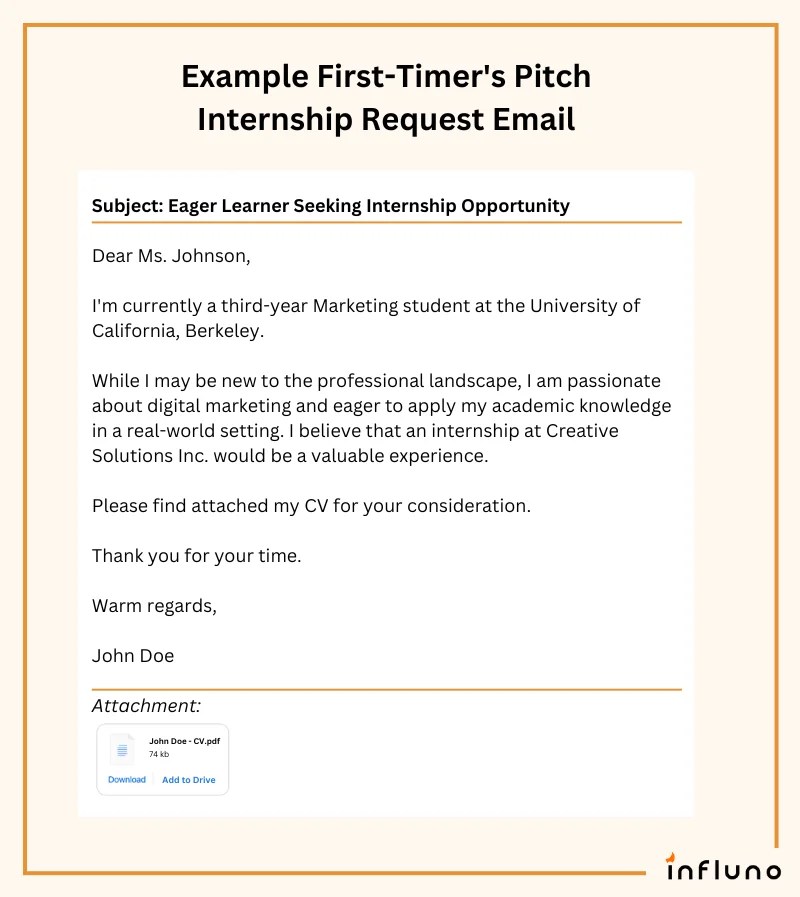
The first draft of a request time email can make or break your professional momentum. Unlike blunt calendar invites or vague "let’s chat" messages, this approach balances urgency with respect—turning a potential no into a confirmed yes. It’s not just about asking for time; it’s about framing the ask so the recipient sees value in granting it.
Yet most professionals still default to generic templates or last-minute pleas, both of which trigger resistance. The difference between a time request email that gets ignored and one that sparks a reply lies in structure, tone, and psychological triggers. Master these, and you’ll transform passive recipients into eager collaborators.
The stakes are higher than ever. With inboxes overflowing and attention spans shrinking, the email that secures a meeting isn’t the one that demands—it’s the one that earns the response. This is where the request time email excels: a methodical, human-centered approach that aligns your ask with the recipient’s priorities.
The Complete Overview of the Request Time Email
A request time email is a strategic communication tool designed to secure dedicated time—whether for a meeting, call, or consultation—without triggering defensive reactions. Unlike cold outreach or transactional invites, it prioritizes mutual benefit, clarity, and reciprocity. The goal isn’t just to book a slot; it’s to position the conversation as an opportunity the recipient wouldn’t want to miss.
What sets it apart is its focus on preemptive alignment. Instead of assuming the recipient’s availability or dismissing their constraints, the email acknowledges their time as a finite resource. This shift in perspective—from "I need this" to "Here’s how this helps you"—is the cornerstone of its effectiveness. Studies in behavioral economics show that people are far more likely to comply with requests framed as collaborative rather than transactional.
Historical Background and Evolution
The concept of structured time request emails emerged alongside the rise of digital communication in the late 1990s, as professionals grappled with the chaos of overflowing inboxes. Early iterations were often clumsy—long-winded justifications for meetings that read like sales pitches. By the 2010s, as remote work and asynchronous collaboration became standard, the format evolved to emphasize brevity, specificity, and psychological priming.
Table of Contents
- The Complete Overview of the Request Time Email
- Historical Background and Evolution
- Core Mechanisms: How It Works
- Key Benefits and Crucial Impact
- Major Advantages
- Comparative Analysis
- Future Trends and Innovations
- Conclusion
- Comprehensive FAQs
- Q: How long should a request time email be?
- Q: What’s the best time to send a request time email?
- Q: Should I include multiple time slots?
- Q: How do I handle no replies?
- Q: Can I use a request time email for internal teams?
- Q: What’s the most common mistake in request time emails?
Today, the most effective request time emails borrow from principles of persuasive writing, including the "how-much" heuristic (where specificity increases perceived value) and the principle of reciprocity (offering something in return for the recipient’s time). Tools like CRM integrations and email templates have further refined the process, but the core remains unchanged: treat the recipient’s time as a gift to be reciprocated, not a resource to be extracted.
Core Mechanisms: How It Works
The request time email operates on three key mechanisms: framing, reciprocity, and reduced cognitive load. Framing involves positioning the meeting as a solution to the recipient’s problems or a step toward their goals. Reciprocity is built by offering value upfront—whether through shared insights, a pre-read document, or a clear agenda. Reduced cognitive load means eliminating ambiguity; the recipient shouldn’t have to decipher your intent or wonder why they should care.
For example, a poorly framed time request might read: "Can we schedule a call to discuss the Q3 report?" This leaves the recipient wondering why and how the report is relevant to them. A refined version, however, might say: "I’ve attached a draft of the Q3 report’s key insights—would 30 minutes next Tuesday work to align on next steps?" Here, the recipient gets context, a tangible deliverable, and a clear ask, all in under 30 seconds of reading.
Key Benefits and Crucial Impact
The request time email isn’t just a tactical tool—it’s a productivity multiplier. By reducing back-and-forth negotiations and minimizing the friction of scheduling, it saves hours weekly for both sender and recipient. For sales teams, it converts cold leads into warm conversations; for managers, it streamlines decision-making; and for freelancers, it turns vague inquiries into paid engagements.
Beyond efficiency, it fosters stronger professional relationships. When recipients feel their time is respected, they’re more likely to engage proactively. This builds goodwill that extends beyond the immediate ask, creating a network of allies rather than a list of obligations.
"An email that respects the recipient’s time is an email that respects the relationship." — Cal Newport, Deep Work
Major Advantages
- Higher response rates: Emails with clear value propositions and low effort to reply see response rates up to 40% higher than generic invites.
- Reduced scheduling friction: By offering specific time slots (e.g., "Tuesday at 2 PM or Thursday at 10 AM"), you eliminate the recipient’s need to propose alternatives.
- Stronger first impressions: A well-crafted time request signals professionalism and consideration, setting the tone for the conversation.
- Scalability: Templates can be adapted for one-on-one meetings, group calls, or even client onboarding without losing personalization.
- Data-driven optimization: Tracking open rates and replies helps refine future request time emails for maximum impact.

Comparative Analysis
| Aspect | Request Time Email | Generic Calendar Invite |
|---|---|---|
| Tone | Collaborative, benefit-driven | Transactional, passive |
| Response Rate | 30–50% (with optimization) | 10–20% |
| Preparation Required | High (value upfront) | Low (minimal context) |
| Follow-Up Ease | Minimal (recipient already engaged) | High (requires re-engagement) |
Future Trends and Innovations
As AI continues to automate email drafting, the request time email will evolve to incorporate dynamic personalization—pulling real-time data (e.g., the recipient’s recent projects or calendar trends) to tailor each ask. Tools like predictive scheduling (e.g., "Based on your last 5 meetings, Tuesday at 3 PM is your most productive slot") will further reduce friction.
Another shift will be toward "asynchronous collaboration" emails, where the time request isn’t just for a call but for a structured exchange (e.g., a shared doc with comments due by Friday). This aligns with the growing trend of hybrid work, where synchronous meetings are reserved for high-stakes discussions.

Conclusion
The request time email is more than a scheduling hack—it’s a reflection of how we value others’ time. In an era where attention is the ultimate currency, the professionals who master this skill will stand out. The key is to move beyond transactional asks and instead focus on creating a dialogue where both parties leave feeling heard and valued.
Start small: Audit your next time request email for clarity, reciprocity, and psychological triggers. The difference between a "maybe" and a "yes" often comes down to how you frame the ask. And in business, as in life, the ask that respects the other person’s time is the one that gets answered.
Comprehensive FAQs
Q: How long should a request time email be?
A: Aim for 3–5 sentences max. The goal is to convey value and the ask without overwhelming the recipient. If you need more context, attach a brief document or link instead.
Q: What’s the best time to send a request time email?
A: Tuesday–Thursday mornings (9–11 AM) have the highest response rates. Avoid Mondays (recipients are catching up) and Fridays (people prioritize wrapping up the week).
Q: Should I include multiple time slots?
A: Yes, but limit to 2–3 options. Too many choices create decision paralysis. Use tools like Calendly to auto-populate slots based on the recipient’s availability.
Q: How do I handle no replies?
A: Wait 5–7 days, then send a polite follow-up: "Circling back—did you get a chance to review the attached? Happy to adjust the timing if needed." Avoid guilt-tripping or aggressive reminders.
Q: Can I use a request time email for internal teams?
A: Absolutely. Internal time requests should emphasize how the meeting aligns with team goals (e.g., "Let’s sync on the client feedback—here’s the summary so you’re prepared").
Q: What’s the most common mistake in request time emails?
A: Assuming the recipient’s availability without considering their workload. Always acknowledge their time as a priority (e.g., "I know you’re busy, so I’ve kept this to 15 minutes").
Leave a Comment
Comments are moderated before appearing. The data you submit is processed according to the Privacy Policy of Medicine.