How to Cancel Amazon Account: Step-by-Step Guide for 2024

Amazon’s dominance in e-commerce has made it a household name, but circumstances change—whether it’s privacy concerns, subscription fatigue, or a shift in shopping habits. If you’re exploring how to cancel your Amazon account, the process isn’t as straightforward as unchecking a box. Behind the scenes, Amazon’s ecosystem of services, one-click purchases, and data tracking creates friction when users attempt to sever ties. The company’s default settings often default to keeping your account active unless you actively pursue termination, leaving many frustrated by hidden steps or incomplete deletions.
The irony lies in Amazon’s own policies: while the platform thrives on convenience, canceling it demands meticulous navigation through layers of settings, payment links, and customer service escalations. A 2023 report from the UK’s Competition and Markets Authority highlighted how major retailers like Amazon design account management to discourage exits, often burying cancellation options in dense menus or requiring multiple verification steps. This isn’t just about closing a shopping account—it’s about reclaiming control over personal data, subscription traps, and the digital footprint Amazon accumulates with every purchase.
For those who’ve decided to take the leap, the path to cancellation varies. Some users opt for a partial shutdown—deactivating services like Prime or Amazon Music while retaining their shopping account. Others seek full account deletion, which triggers a cascade of actions: refunds for pending orders, data removal requests, and even the severing of linked payment methods. The process isn’t instantaneous, and Amazon’s automated systems may resist termination unless you follow a precise sequence of steps. Below, we break down the mechanics, benefits, and alternatives to ensure you leave on your terms.
The Complete Overview of How to Cancel Amazon Account
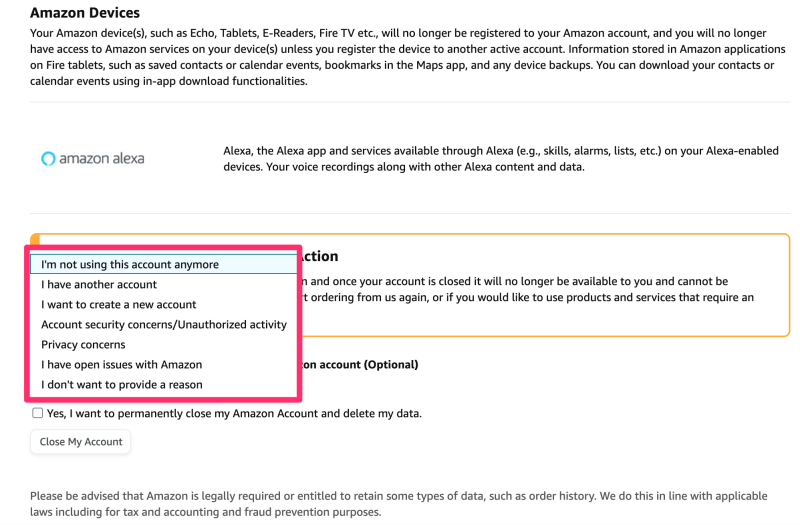
Amazon’s account cancellation process is designed with two primary goals: minimizing customer churn and maximizing data retention. The company’s default settings often prioritize keeping users engaged—whether through loyalty programs, saved payment methods, or one-click reordering—rather than facilitating an easy exit. This creates a paradox: a platform built on frictionless shopping becomes a labyrinth when users attempt to disengage. The result? Many abandon the process midway, unaware that partial cancellations (like pausing Prime) don’t equate to full account deletion.The actual steps to cancel an Amazon account depend on whether you’re targeting a single service (e.g., Amazon Music) or the entire account. For full termination, Amazon requires users to initiate a data deletion request, which triggers a 30-day review period before permanent erasure. During this window, the company may contact you to confirm intent, especially if the account has active orders, subscriptions, or stored payment details. Unlike competitors, Amazon doesn’t offer a one-click cancellation button; instead, it forces users through a multi-step verification process, often requiring identity confirmation via email or phone.
Historical Background and Evolution
Amazon’s account management policies have evolved alongside its business model. In the platform’s early years (late 1990s to early 2000s), cancellation was a straightforward affair: users could close accounts via a simple form, and data deletion was less scrutinized. However, as Amazon expanded into subscriptions (Prime in 2005), digital services (Kindle, Music, Video), and third-party seller integrations, the complexity of account termination grew. The introduction of one-click purchasing in 2005 further entrenched user data into Amazon’s systems, making cancellations riskier for the company.By the 2010s, Amazon’s shift toward a data-driven business model—leveraging purchase histories for targeted ads and recommendations—meant that full account deletion became a rare event. The company introduced tiered cancellation options: users could pause Prime, remove payment methods, or deactivate services without fully closing the account. This strategy served two purposes: retaining customer data for future monetization and reducing the administrative burden of processing complete deletions. Today, Amazon’s cancellation process reflects this duality—offering partial exits while making full termination a deliberate, multi-step journey.
Core Mechanisms: How It Works
At its core, canceling an Amazon account involves three critical actions: service deactivation, data deletion request, and payment method removal. The first step—deactivating services like Prime or Amazon Music—is relatively simple and can be done in minutes via the account settings. However, this doesn’t close the account; it merely pauses certain functionalities. For full cancellation, users must submit a deletion request through Amazon’s customer service portal, which triggers a 30-day review period.Table of Contents
- The Complete Overview of How to Cancel Amazon Account
- Historical Background and Evolution
- Core Mechanisms: How It Works
- Key Benefits and Crucial Impact
- Major Advantages
- Comparative Analysis
- Future Trends and Innovations
- Conclusion
- Comprehensive FAQs
- Q: Can I cancel my Amazon account online without contacting customer service?
- Q: What happens to my orders if I cancel my Amazon account?
- Q: Will canceling my Amazon account delete my Kindle content?
- Q: Can I cancel Amazon Prime separately from my shopping account?
- Q: How long does it take for Amazon to fully delete my account?
- Q: What if Amazon denies my cancellation request?
- Q: Does canceling my Amazon account affect my Amazon Business account?
- Q: Can I reactivate my Amazon account after cancellation?
- Q: Will canceling my Amazon account remove my payment methods from other services?
- Q: Is there a fee to cancel my Amazon account?
During this period, Amazon’s systems scan for active orders, subscriptions, or stored data that might prevent deletion. If the account is clean (no pending transactions or linked services), the company proceeds with permanent erasure. However, if discrepancies are found—such as an unpaid subscription or a recent purchase—the request may be denied, and users must resolve these issues before retrying. This mechanism ensures Amazon retains revenue streams while appearing compliant with data protection regulations.
Key Benefits and Crucial Impact
Understanding the implications of canceling an Amazon account is as important as knowing the steps. For privacy-conscious users, full deletion removes purchase histories, browsing data, and payment details from Amazon’s servers. This is particularly valuable given Amazon’s extensive data collection practices, which include tracking off-Amazon activity through its retail network and third-party partnerships. A canceled account also severs ties to Amazon’s ecosystem of services, eliminating auto-renewing subscriptions and targeted ads based on past behavior.However, the process isn’t without trade-offs. Canceling may void active warranties on purchased items, disrupt recurring deliveries (e.g., Subscribe & Save orders), and complicate returns for pending shipments. Additionally, Amazon’s data retention policies mean that even after deletion, some metadata (like order summaries) may persist in backups for compliance purposes. Weighing these factors is essential before initiating cancellation, as the impact extends beyond the account itself.
"Amazon’s business model thrives on engagement, not exits. The cancellation process is designed to make users think twice—whether through hidden fees, data retention, or the sheer complexity of the steps required." — Competition & Markets Authority (UK), 2023
Major Advantages
Despite the challenges, canceling an Amazon account offers several tangible benefits:- Data Privacy: Permanently removes purchase history, browsing data, and payment information from Amazon’s databases.
For users concerned about corporate data practices, full account deletion is the most decisive action. However, partial cancellations (e.g., pausing Prime) may suffice for those seeking cost savings without the hassle of complete termination.

Comparative Analysis
| Aspect | Amazon Account Cancellation | Alternative Platforms (e.g., Walmart, eBay) ||--------------------------|--------------------------------------------------------|------------------------------------------------------|
| Complexity | Multi-step, requires customer service intervention. | Often one-click or automated via settings. |
| Data Retention | 30-day review; some data may persist in backups. | Immediate deletion in most cases. |
| Subscription Handling| Requires manual deactivation of each service. | Bundled cancellation options available. |
| Refund Policies | Pending orders may be refunded; subscriptions paused. | Varies by platform; some offer instant credits. |
Amazon’s process stands out for its granularity, requiring users to address each service individually. Competitors like Walmart or eBay typically offer streamlined cancellation paths, though they may still retain some data for operational purposes.
Future Trends and Innovations
As data privacy regulations tighten (e.g., GDPR in Europe, CCPA in California), Amazon may face pressure to simplify account deletion. The European Union’s Digital Services Act (DSA) could introduce mandatory "right to erasure" provisions, forcing platforms to streamline cancellation processes. However, Amazon’s incentive to retain user data—whether for ads, recommendations, or ecosystem lock-in—suggests resistance to drastic changes.Innovations like biometric verification for account deletions (e.g., facial recognition or fingerprint confirmation) could emerge, adding another layer of friction. Alternatively, third-party tools may arise to automate the cancellation process, though Amazon’s terms of service currently prohibit unauthorized data access. For now, users remain at the mercy of Amazon’s policies, but regulatory shifts could democratize the exit process in the coming years.
Conclusion
Canceling an Amazon account is not a decision to be taken lightly, nor is it a process that unfolds in minutes. It demands patience, attention to detail, and an understanding of the platform’s underlying mechanics. Whether you’re seeking privacy, financial control, or simply a break from Amazon’s ecosystem, the steps outlined here provide a roadmap to termination. However, be prepared for pushback—Amazon’s systems are designed to retain users, and full deletion may require persistence.For those who proceed, the rewards—data autonomy, subscription freedom, and reduced corporate tracking—are substantial. But the trade-offs, such as disrupted services or lost warranties, must be weighed carefully. As digital privacy becomes a cornerstone of consumer rights, the ability to cancel accounts like Amazon’s may soon be a standard expectation rather than an arduous task.
Comprehensive FAQs
Q: Can I cancel my Amazon account online without contacting customer service?
No. While you can pause services like Prime or remove payment methods through account settings, full account cancellation requires submitting a deletion request via Amazon’s customer service portal. The process cannot be completed entirely online without human intervention.
Q: What happens to my orders if I cancel my Amazon account?
Pending orders may be canceled or refunded, depending on their status. Completed orders remain in your purchase history unless you request full data deletion. Amazon will not process new orders after cancellation, but existing shipments will still arrive.
Q: Will canceling my Amazon account delete my Kindle content?
Yes, but only if you initiate a full account deletion. Kindle content tied to your Amazon account will be removed during the 30-day review period. However, if you’ve purchased DRM-free books or audiobooks, you may still access them offline after cancellation.
Q: Can I cancel Amazon Prime separately from my shopping account?
Yes. You can pause or cancel Amazon Prime independently through your account settings. This does not affect your main shopping account or other services like Amazon Music or Video.
Q: How long does it take for Amazon to fully delete my account?
The process begins after submitting a deletion request and typically takes 30 days. Amazon reviews the account for active orders, subscriptions, or stored data before proceeding with permanent erasure. You’ll receive confirmation via email once completed.
Q: What if Amazon denies my cancellation request?
Denials usually occur due to active subscriptions, pending orders, or linked payment methods. You must resolve these issues (e.g., cancel subscriptions, complete returns) before retrying. If problems persist, contact Amazon’s customer service for further assistance.
Q: Does canceling my Amazon account affect my Amazon Business account?
No. Amazon Business accounts operate separately from personal accounts. Canceling one will not impact the other, though you’ll need to manage them independently.
Q: Can I reactivate my Amazon account after cancellation?
No. Once Amazon permanently deletes your account, it cannot be reactivated. Ensure you’ve backed up important data (e.g., wish lists, order histories) before proceeding.
Q: Will canceling my Amazon account remove my payment methods from other services?
No. Canceling your Amazon account only removes payment methods linked to that specific account. If you’ve used the same card elsewhere (e.g., Amazon Music, third-party apps), those entries remain intact.
Q: Is there a fee to cancel my Amazon account?
No. Amazon does not charge fees for account cancellation. However, you may incur charges for unresolved subscriptions or pending orders if not addressed before deletion.
Leave a Comment
Comments are moderated before appearing. The data you submit is processed according to the Privacy Policy of Medicine.